

Your graphics add a nice touch to my presentations and I recently used them for one of my all-hands meetings. Your toolbox adds professionalism to my slides. Instead of using standard clipart.
Claude Jones, Director of Engineer, @Walmartlabs, USA

Your graphics add a nice touch to my presentations and I recently used them for one of my all-hands meetings. Your toolbox adds professionalism to my slides. Instead of using standard clipart.
Claude Jones, Director of Engineer, @Walmartlabs, USA
I needed a fresh look at some of my slides. I've tried to find a way to create a paintbrush effect, to underline, accentuate, add some color and the handwritten markers were just the things. Very easy to use, easy to size, change the color. It was an affordable, perfect solution and I'm happy to recommend it.
Anonymous, US
The crisp, clean look of the graphics, and the fact that it allowed me to easily edit and change the colors to match the template was my main reason for purchasing them.
Brandie Jenkins, E-learning Developer, USA
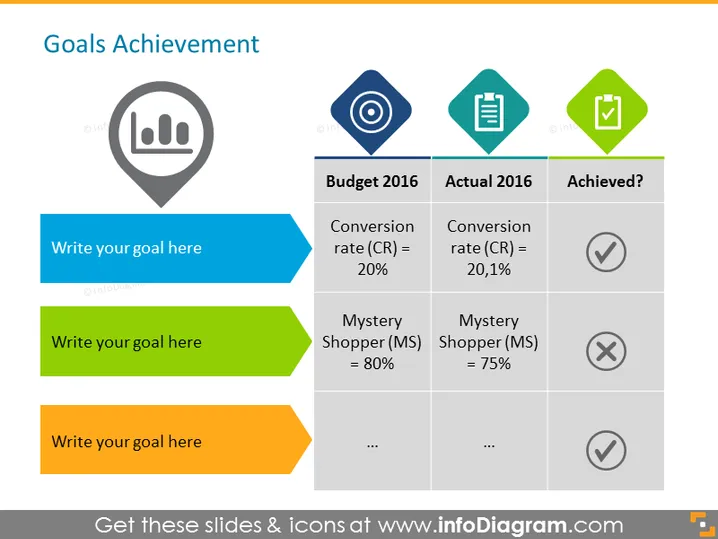
Retail goals achievement slide with a planned budget for 20XX year vs. actual 20XX year status summary. Highlight which goals have been achieved, and which have not; e.g. conversion rate and mystery shopper percentage. All the graphics are editable, so you can update the numbers, resize the shapes and change colors while keeping the quality of your presentation. Click on the picture to see more retail update presentation ideas.
Data Table, Bar Chart Icon Vector, Rhombus Shapes, Flat Outline Icons, Goal Icon, List Icon, Checklist Icon, Color Coding



