

Your graphics add a nice touch to my presentations and I recently used them for one of my all-hands meetings. Your toolbox adds professionalism to my slides. Instead of using standard clipart.
Claude Jones, Director of Engineer, @Walmartlabs, USA

Your graphics add a nice touch to my presentations and I recently used them for one of my all-hands meetings. Your toolbox adds professionalism to my slides. Instead of using standard clipart.
Claude Jones, Director of Engineer, @Walmartlabs, USA
I needed a fresh look at some of my slides. I've tried to find a way to create a paintbrush effect, to underline, accentuate, add some color and the handwritten markers were just the things. Very easy to use, easy to size, change the color. It was an affordable, perfect solution and I'm happy to recommend it.
Anonymous, US
The crisp, clean look of the graphics, and the fact that it allowed me to easily edit and change the colors to match the template was my main reason for purchasing them.
Brandie Jenkins, E-learning Developer, USA
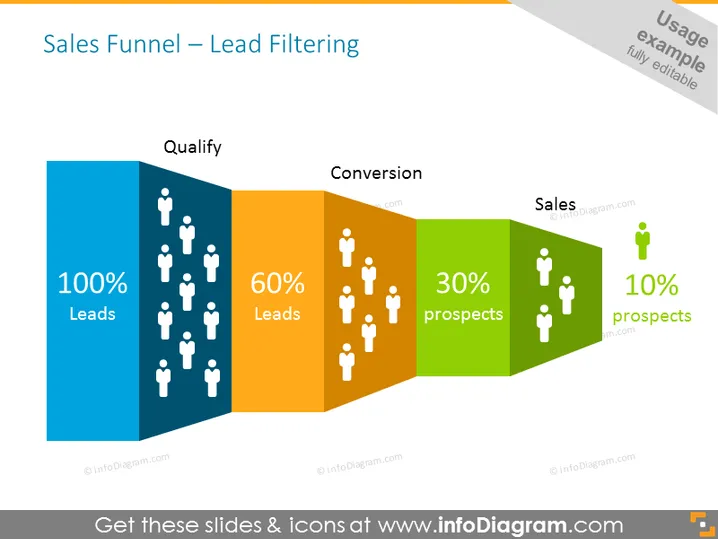
The slide outlines the progressive stages of a sales funnel with the focus on lead filtering. The funnel begins with "100% Leads" signifying the total number of leads generated. This stage refers to the initial pool of potential customers before any qualification process. The next stage is "60% Leads," indicating the qualification of leads with a drop-off, aiming to focus on those more likely to purchase. The following section "30% Prospects" represents a further reduction after conversion efforts, showing leads that have expressed a strong interest or intent to buy. Lastly, "10% Prospects" depicts the final sales stage, where the leads have been converted into actual sales, illustrating the narrowing down to actual customers.
The slide has a clean and modern design, using color-coding to differentiate the stages of the sales process. The decreasing number of human silhouettes effectively illustrates the filtering process as potential leads turn into sales.



