

Your graphics add a nice touch to my presentations and I recently used them for one of my all-hands meetings. Your toolbox adds professionalism to my slides. Instead of using standard clipart.
Claude Jones, Director of Engineer, @Walmartlabs, USA

Your graphics add a nice touch to my presentations and I recently used them for one of my all-hands meetings. Your toolbox adds professionalism to my slides. Instead of using standard clipart.
Claude Jones, Director of Engineer, @Walmartlabs, USA
I needed a fresh look at some of my slides. I've tried to find a way to create a paintbrush effect, to underline, accentuate, add some color and the handwritten markers were just the things. Very easy to use, easy to size, change the color. It was an affordable, perfect solution and I'm happy to recommend it.
Anonymous, US
The crisp, clean look of the graphics, and the fact that it allowed me to easily edit and change the colors to match the template was my main reason for purchasing them.
Brandie Jenkins, E-learning Developer, USA
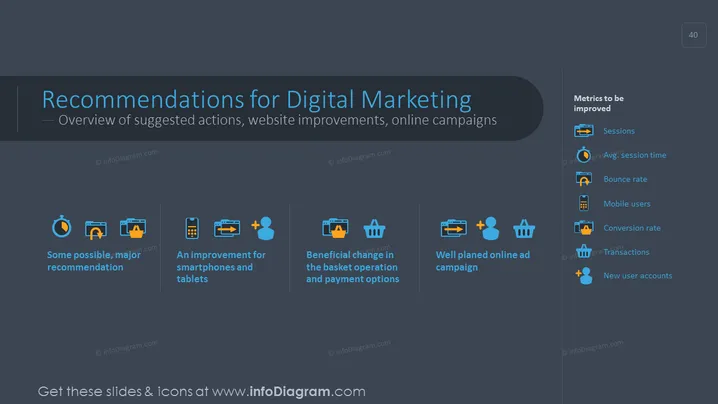
The slide titled "Recommendations for Digital Marketing" presents an overview of suggested actions for website improvements and online campaigns. It lists four recommendations: "Some possible, major recommendation," referring to general yet significant advice; "An improvement for smartphones and tablets," which suggests enhancing mobile compatibility; "Beneficial change in the basket operation and payment options," recommending optimizations in the e-commerce checkout process; and "Well planned online ad campaign," emphasizing the need for strategic advertising efforts. On the right, the slide highlights "Metrics to be improved" such as Sessions, Avg. Session Time, Bounce Rate, Mobile Users, Conversion Rate, Transactions, and New User Accounts, all crucial for evaluating the effectiveness of digital marketing efforts.
The slide has a clean, modern design with high contrast between the text, icons, and the dark background, making the information easily readable. The use of color is minimal but systematic, highlighting key areas of the slide.



