

Your graphics add a nice touch to my presentations and I recently used them for one of my all-hands meetings. Your toolbox adds professionalism to my slides. Instead of using standard clipart.
Claude Jones, Director of Engineer, @Walmartlabs, USA

Your graphics add a nice touch to my presentations and I recently used them for one of my all-hands meetings. Your toolbox adds professionalism to my slides. Instead of using standard clipart.
Claude Jones, Director of Engineer, @Walmartlabs, USA
I needed a fresh look at some of my slides. I've tried to find a way to create a paintbrush effect, to underline, accentuate, add some color and the handwritten markers were just the things. Very easy to use, easy to size, change the color. It was an affordable, perfect solution and I'm happy to recommend it.
Anonymous, US
The crisp, clean look of the graphics, and the fact that it allowed me to easily edit and change the colors to match the template was my main reason for purchasing them.
Brandie Jenkins, E-learning Developer, USA
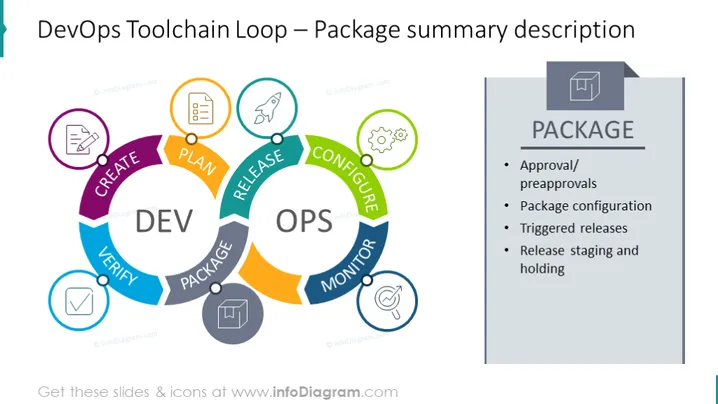
The slide presents a summary of the 'Package' phase in the DevOps Toolchain Loop, detailing the crucial steps in this stage, such as "Approval/preapprovals," "Package configuration," "Triggered releases," and "Release staging and holding." Each item represents a structured approach to managing software releases, where "Approval/preapprovals" ensure governance, "Package configuration" refers to setting up the software for deployment, "Triggered releases" automate the release process, and "Release staging and holding" involves preparing and verifying the release before it goes live.
The slide's overall look is clean and modern, emphasizing distinct sections for visual clarity. The use of colors and icons effectively communicates the cyclic nature of DevOps practices.



