

Your graphics add a nice touch to my presentations and I recently used them for one of my all-hands meetings. Your toolbox adds professionalism to my slides. Instead of using standard clipart.
Claude Jones, Director of Engineer, @Walmartlabs, USA

Your graphics add a nice touch to my presentations and I recently used them for one of my all-hands meetings. Your toolbox adds professionalism to my slides. Instead of using standard clipart.
Claude Jones, Director of Engineer, @Walmartlabs, USA
I needed a fresh look at some of my slides. I've tried to find a way to create a paintbrush effect, to underline, accentuate, add some color and the handwritten markers were just the things. Very easy to use, easy to size, change the color. It was an affordable, perfect solution and I'm happy to recommend it.
Anonymous, US
The crisp, clean look of the graphics, and the fact that it allowed me to easily edit and change the colors to match the template was my main reason for purchasing them.
Brandie Jenkins, E-learning Developer, USA
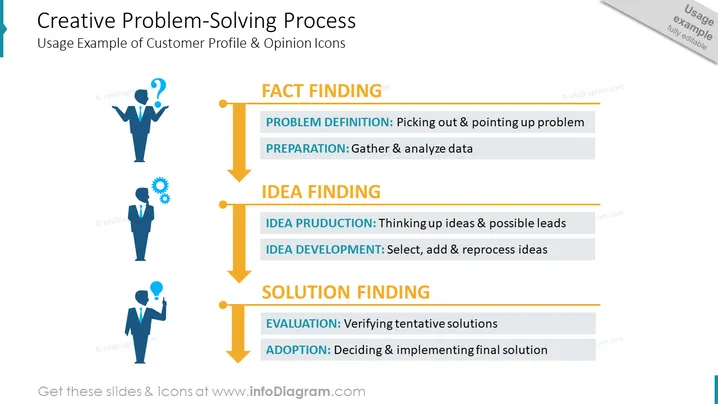
This PowerPoint slide outlines a structured approach to problem-solving, featuring the "Creative Problem-Solving Process." It begins with the "FACT FINDING" stage, which includes "PROBLEM DEFINITION" (understanding and highlighting the issue) and "PREPARATION" (data collection and analysis). The next phase is "IDEA FINDING," comprising "IDEA PRODUCTION" (generating ideas and leads) and "IDEA DEVELOPMENT" (refinement and enhancement of ideas). The final steps are "SOLUTION FINDING," entailing "EVALUATION" (testing and assessing solutions) and "ADOPTION" (the decision-making and application of solutions).
The overall look of the slide is clean and professional, with a logical flow depicted by the central arrow. The use of icons and color-coding effectively highlights different stages of the creative problem-solving process.



