
Your graphics add a nice touch to my presentations and I recently used them for one of my all-hands meetings. Your toolbox adds professionalism to my slides. Instead of using standard clipart.
Claude Jones, Director of Engineer, @Walmartlabs, USA

Your graphics add a nice touch to my presentations and I recently used them for one of my all-hands meetings. Your toolbox adds professionalism to my slides. Instead of using standard clipart.
Claude Jones, Director of Engineer, @Walmartlabs, USA

I needed a fresh look at some of my slides. I've tried to find a way to create a paintbrush effect, to underline, accentuate, add some color and the handwritten markers were just the things. Very easy to use, easy to size, change the color. It was an affordable, perfect solution and I'm happy to recommend it.
Anonymous, US
The crisp, clean look of the graphics, and the fact that it allowed me to easily edit and change the colors to match the template was my main reason for purchasing them.
Brandie Jenkins, E-learning Developer, USA
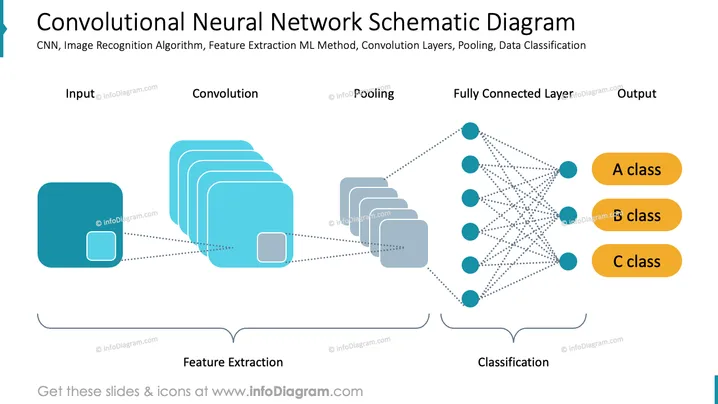
The PowerPoint slide presents a simplified overview of how a Convolutional Neural Network (CNN) processes data from input to output. The slide breaks down the workflow into stages, starting with input, moving through convolution and pooling steps which are collectively known as feature extraction, then passing through a fully connected layer, and ending with the classification into A, B, or C class. Each step plays a crucial role in determining features, reducing complexity, and assigning categories based on learned characteristics.
The slide has a modern and technical feel with clear graphics representing the stages of a Convolutional Neural Network. The use of dotted lines and different shapes effectively conveys the notion of information flow through the system.


