

Your graphics add a nice touch to my presentations and I recently used them for one of my all-hands meetings. Your toolbox adds professionalism to my slides. Instead of using standard clipart.
Claude Jones, Director of Engineer, @Walmartlabs, USA

Your graphics add a nice touch to my presentations and I recently used them for one of my all-hands meetings. Your toolbox adds professionalism to my slides. Instead of using standard clipart.
Claude Jones, Director of Engineer, @Walmartlabs, USA
I needed a fresh look at some of my slides. I've tried to find a way to create a paintbrush effect, to underline, accentuate, add some color and the handwritten markers were just the things. Very easy to use, easy to size, change the color. It was an affordable, perfect solution and I'm happy to recommend it.
Anonymous, US
The crisp, clean look of the graphics, and the fact that it allowed me to easily edit and change the colors to match the template was my main reason for purchasing them.
Brandie Jenkins, E-learning Developer, USA
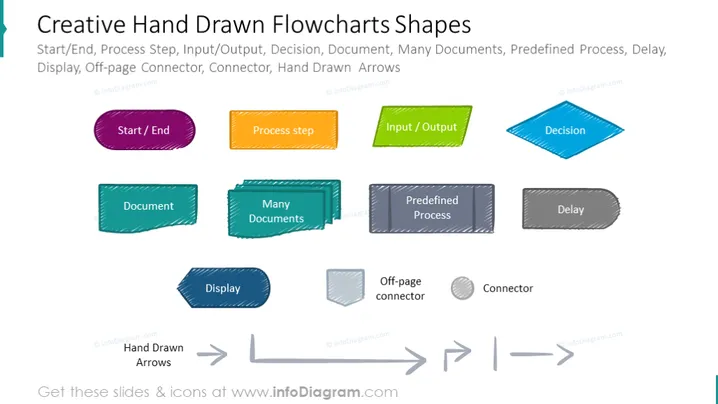
The PowerPoint slide titled "Creative Hand Drawn Flowcharts Shapes" displays various shapes used to represent different elements in a flowchart: "Start/End" signifies the beginning or conclusion of a process; "Process Step" represents a stage within a process; "Input/Output" indicates the entry or delivery of data; and "Decision" points to a branching where a choice must be made. The shapes for "Document" and "Many Documents" are for depicting single and multiple documents respectively; "Predefined Process" denotes an established sequence of actions; "Delay" depicts a pause or wait in the process; "Display" shows data or information output; "Off-page Connector" represents continuity from another page; and "Connector" and "Hand Drawn Arrows" are for indicating the direction of flow within the flowchart.
The slide has a clean, creative appearance with a playful twist on the standard flowchart symbols. The hand-drawn style adds a personal and informal touch to the design of typical flowchart elements.



