

Your graphics add a nice touch to my presentations and I recently used them for one of my all-hands meetings. Your toolbox adds professionalism to my slides. Instead of using standard clipart.
Claude Jones, Director of Engineer, @Walmartlabs, USA

Your graphics add a nice touch to my presentations and I recently used them for one of my all-hands meetings. Your toolbox adds professionalism to my slides. Instead of using standard clipart.
Claude Jones, Director of Engineer, @Walmartlabs, USA
I needed a fresh look at some of my slides. I've tried to find a way to create a paintbrush effect, to underline, accentuate, add some color and the handwritten markers were just the things. Very easy to use, easy to size, change the color. It was an affordable, perfect solution and I'm happy to recommend it.
Anonymous, US
The crisp, clean look of the graphics, and the fact that it allowed me to easily edit and change the colors to match the template was my main reason for purchasing them.
Brandie Jenkins, E-learning Developer, USA
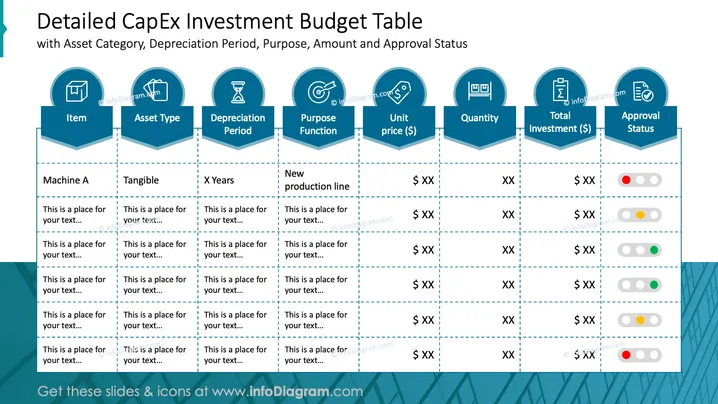
La diapositive intitulée "Tableau budgétaire détaillé des investissements en CapEx" décompose les différentes composantes d'un budget d'investissement. Elle comprend des classifications telles que 'Article', 'Type d'actif', qui indique si un actif est tangible ou intangible, 'Période d'amortissement', qui spécifie la durée de réduction de la valeur de l'actif, 'Fonction d'affectation' qui décrit l'utilisation de l'investissement, 'Prix unitaire' indiquant le coût de l'actif individuel, la 'Quantité' d'actifs à acheter, 'Investissement total' indiquant l'engagement financier global et 'Statut d'approbation' utilisant un système de codes couleurs pour signaler l'étape d'approbation.
L'aspect général de la diapositive est conçu pour la clarté et l'efficacité, en mettant l'accent sur la présentation des données. L'utilisation d'images emblématiques aide à identifier rapidement les catégories et les statuts en un coup d'œil.



