

Your graphics add a nice touch to my presentations and I recently used them for one of my all-hands meetings. Your toolbox adds professionalism to my slides. Instead of using standard clipart.
Claude Jones, Director of Engineer, @Walmartlabs, USA

Your graphics add a nice touch to my presentations and I recently used them for one of my all-hands meetings. Your toolbox adds professionalism to my slides. Instead of using standard clipart.
Claude Jones, Director of Engineer, @Walmartlabs, USA
I needed a fresh look at some of my slides. I've tried to find a way to create a paintbrush effect, to underline, accentuate, add some color and the handwritten markers were just the things. Very easy to use, easy to size, change the color. It was an affordable, perfect solution and I'm happy to recommend it.
Anonymous, US
The crisp, clean look of the graphics, and the fact that it allowed me to easily edit and change the colors to match the template was my main reason for purchasing them.
Brandie Jenkins, E-learning Developer, USA
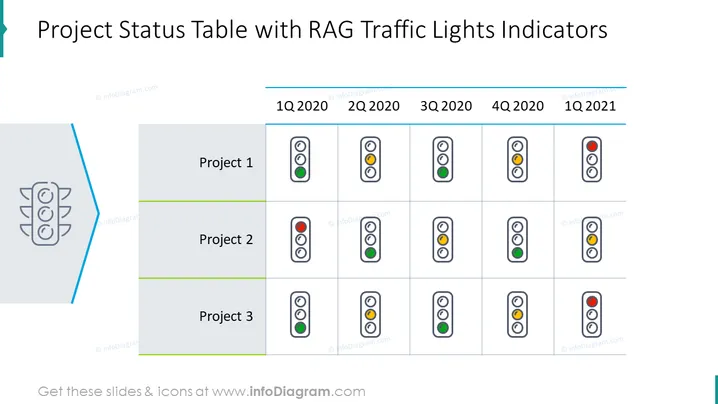
Ce contenu est le Tableau de Statut du Projet avec le Modèle de Feux RAG. Il est utilisé en gestion de projet pour fournir une représentation visuelle du statut d'un projet en utilisant le feu RAG. Rouge indique qu'une tâche est retardée ou a échoué, Ambre indique qu'une livraison est à risque de retard ou d'échec, et Vert montre qu'une tâche est sur la bonne voie et devrait être livrée comme prévu. En utilisant un système de feux RAG, vous pouvez rapidement identifier les domaines du projet nécessitant une attention particulière, prioriser votre charge de travail et suivre l'avancement global du projet. Vous pouvez télécharger ce modèle PPT sur Google Slides et Keynote.
Fond Blanc, Tableau de Statut du Projet, Icône de Feux de Circulation



