
Your graphics add a nice touch to my presentations and I recently used them for one of my all-hands meetings. Your toolbox adds professionalism to my slides. Instead of using standard clipart.
Claude Jones, Director of Engineer, @Walmartlabs, USA
Your graphics add a nice touch to my presentations and I recently used them for one of my all-hands meetings. Your toolbox adds professionalism to my slides. Instead of using standard clipart.
Claude Jones, Director of Engineer, @Walmartlabs, USA
I needed a fresh look at some of my slides. I've tried to find a way to create a paintbrush effect, to underline, accentuate, add some color and the handwritten markers were just the things. Very easy to use, easy to size, change the color. It was an affordable, perfect solution and I'm happy to recommend it.
Anonymous, US
The crisp, clean look of the graphics, and the fact that it allowed me to easily edit and change the colors to match the template was my main reason for purchasing them.
Brandie Jenkins, E-learning Developer, USA
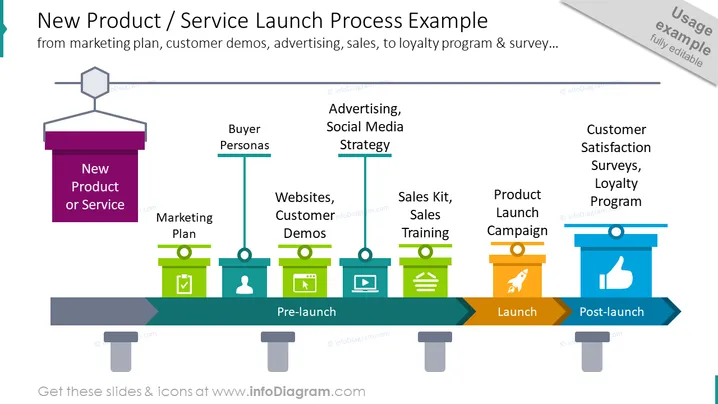
La diapositive illustre les différentes étapes d'un processus de lancement de nouveau produit ou service. Elle met en évidence des éléments clés tels que Plan Marketing, Personas d'Acheteurs, Publicité, Stratégie sur les Réseaux Sociaux, Sites Web, Démos Clients, Kit de Vente, Formation à la Vente, Campagne de Lancement du Produit, et Sondages de Satisfaction Client, Programme de Fidélité. Ces éléments sont organisés chronologiquement en phases de pré-lancement, de lancement et de post-lancement pour donner une vue d'ensemble complète du processus de lancement, depuis la planification initiale jusqu'aux activités post-lancement visant à maintenir l'engagement et la fidélité des clients.




