

Your graphics add a nice touch to my presentations and I recently used them for one of my all-hands meetings. Your toolbox adds professionalism to my slides. Instead of using standard clipart.
Claude Jones, Director of Engineer, @Walmartlabs, USA

Your graphics add a nice touch to my presentations and I recently used them for one of my all-hands meetings. Your toolbox adds professionalism to my slides. Instead of using standard clipart.
Claude Jones, Director of Engineer, @Walmartlabs, USA
I needed a fresh look at some of my slides. I've tried to find a way to create a paintbrush effect, to underline, accentuate, add some color and the handwritten markers were just the things. Very easy to use, easy to size, change the color. It was an affordable, perfect solution and I'm happy to recommend it.
Anonymous, US
The crisp, clean look of the graphics, and the fact that it allowed me to easily edit and change the colors to match the template was my main reason for purchasing them.
Brandie Jenkins, E-learning Developer, USA
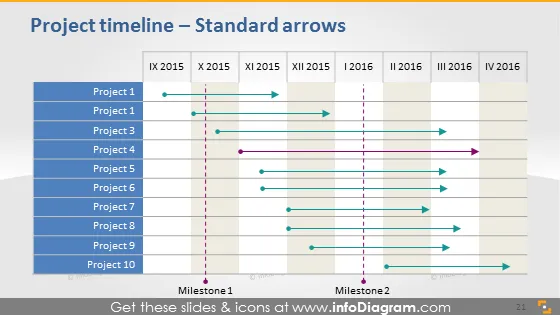
Cette diapositive PowerPoint illustre une chronologie de projet utilisant des flèches standards. Elle présente une configuration chronologique allant de IX 2015 à IV 2016 avec dix bandes horizontales étiquetées 'Projet 1' à 'Projet 10.' Chaque bande a une flèche colorée distincte indiquant la durée du projet sur la chronologie. Deux lignes verticales en pointillés signifient respectivement 'Jalon 1' et 'Jalon 2', marquant des phases ou événements significatifs au sein de la chronologie. Les flèches et les jalons offrent une représentation visuelle claire des séquences de projets et des points critiques.
La diapositive a une esthétique propre et professionnelle, avec un système de codage couleur qui simplifie les informations complexes de planification. Les éléments visuels sont disposés de manière à rendre la séquence et le chevauchement des projets immédiatement apparents.



