

Your graphics add a nice touch to my presentations and I recently used them for one of my all-hands meetings. Your toolbox adds professionalism to my slides. Instead of using standard clipart.
Claude Jones, Director of Engineer, @Walmartlabs, USA

Your graphics add a nice touch to my presentations and I recently used them for one of my all-hands meetings. Your toolbox adds professionalism to my slides. Instead of using standard clipart.
Claude Jones, Director of Engineer, @Walmartlabs, USA
I needed a fresh look at some of my slides. I've tried to find a way to create a paintbrush effect, to underline, accentuate, add some color and the handwritten markers were just the things. Very easy to use, easy to size, change the color. It was an affordable, perfect solution and I'm happy to recommend it.
Anonymous, US
The crisp, clean look of the graphics, and the fact that it allowed me to easily edit and change the colors to match the template was my main reason for purchasing them.
Brandie Jenkins, E-learning Developer, USA
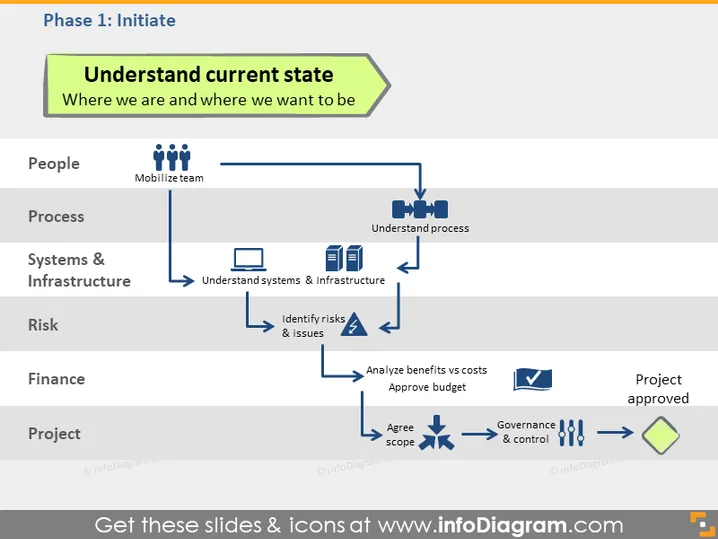
La diapositive est intitulée "Comprendre l'état actuel" et se concentre sur où nous en sommes et où nous voulons être. Elle décrit la phase initiale d'un projet ou d'un plan à travers divers aspects :
Chaque aspect est une partie critique de l'initiation du projet, indiquant des étapes telles que la mobilisation de l'équipe, la compréhension des processus, l'analyse des systèmes, l'identification des risques, l'évaluation financière, l'accord sur la portée, et finalement l'obtention de l'approbation du projet.
La diapositive utilise une mise en page de flux de processus, chaque catégorie étant connectée par des flèches horizontales qui indiquent la progression. Les icônes et le codage par couleur sont utilisés efficacement pour distinguer les différents éléments et étapes.



