
Your graphics add a nice touch to my presentations and I recently used them for one of my all-hands meetings. Your toolbox adds professionalism to my slides. Instead of using standard clipart.
Claude Jones, Director of Engineer, @Walmartlabs, USA
Your graphics add a nice touch to my presentations and I recently used them for one of my all-hands meetings. Your toolbox adds professionalism to my slides. Instead of using standard clipart.
Claude Jones, Director of Engineer, @Walmartlabs, USA
I needed a fresh look at some of my slides. I've tried to find a way to create a paintbrush effect, to underline, accentuate, add some color and the handwritten markers were just the things. Very easy to use, easy to size, change the color. It was an affordable, perfect solution and I'm happy to recommend it.
Anonymous, US
The crisp, clean look of the graphics, and the fact that it allowed me to easily edit and change the colors to match the template was my main reason for purchasing them.
Brandie Jenkins, E-learning Developer, USA
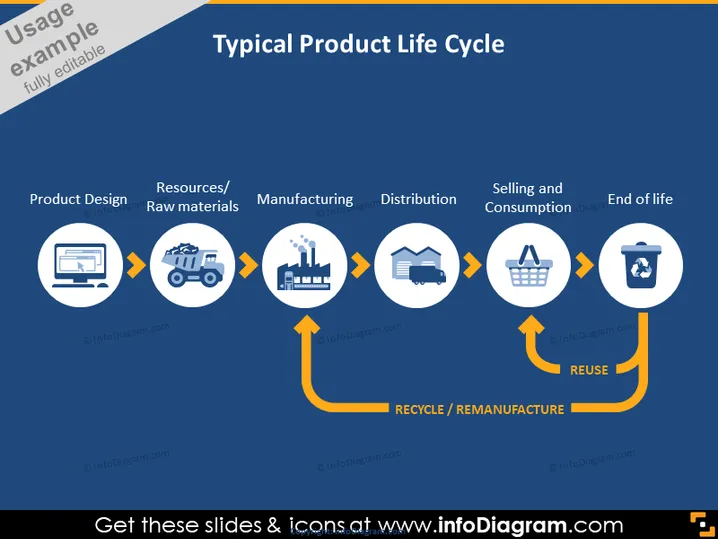
La diapositive décrit les étapes d'un cycle de vie typique d'un produit, en commençant par 'Conception du Produit', où une idée est conceptualisée et un prototype est créé. Ensuite vient 'Ressources/Matières premières', qui indique l'approvisionnement en matériaux nécessaires. 'Fabrication' suit, où les matières premières sont transformées en produit final. L'étape de 'Distribution' garantit que le produit atteint les détaillants ou consommateurs. 'Vente et Consommation' est l'endroit où le produit est acheté et utilisé. Enfin, 'Fin de vie' représente l'étape où le produit est jeté, suivie de 'REUTILISATION' décrivant l'action de recycler ou de remanufacturer le produit pour un usage ultérieur.
La diapositive utilise un schéma de couleurs simplifié de bleu, blanc et orange pour mettre en valeur visuellement les points clés. Les icônes circulaires et les flèches de connexion créent un flux clair et facile à suivre des étapes du cycle de vie du produit.




