
Commentaires
Your graphics add a nice touch to my presentations and I recently used them for one of my all-hands meetings. Your toolbox adds professionalism to my slides. Instead of using standard clipart.
I needed a fresh look at some of my slides. I've tried to find a way to create a paintbrush effect, to underline, accentuate, add some color and the handwritten markers were just the things. Very easy to use, easy to size, change the color. It was an affordable, perfect solution and I'm happy to recommend it.
The crisp, clean look of the graphics, and the fact that it allowed me to easily edit and change the colors to match the template was my main reason for purchasing them.
Description
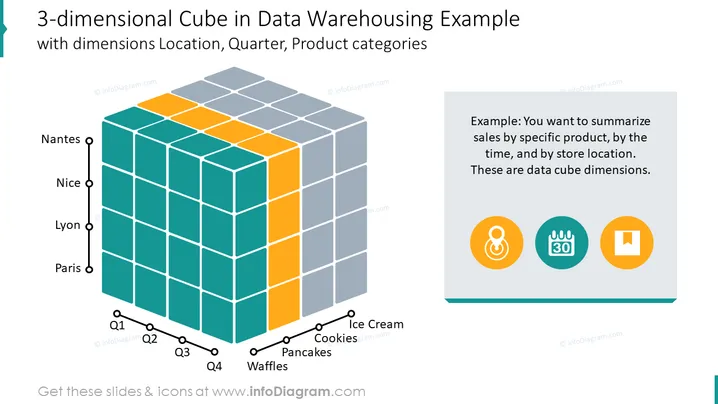
Cube tridimensionnel dans le modèle de présentation d'entrepôt de données
Description de la diapositive : Le modèle créé dans PowerPoint présente les ventes :
- par produit spécifique
- par période
- par emplacement du magasin
Le cube OLAP tridimensionnel présente ces données graphiquement. Chacune des dimensions est visualisée par l'icône adéquate.
La diapositive du modèle de cube tridimensionnel dans l'entrepôt de données contient :
dimension, cube dimensionnel, données, entrepôt de données, emplacement, trimestre, produit, catégories, cube OLAP, icônes.
Toutes les formes, couleurs et textes sont entièrement modifiables dans PowerPoint.
Comment éditer
Comment modifier le texte et les couleurs

Comment développer / raccourcir un diagramme

Comment remplacer les icônes dans infoDiagram PPT


