

Your graphics add a nice touch to my presentations and I recently used them for one of my all-hands meetings. Your toolbox adds professionalism to my slides. Instead of using standard clipart.
Claude Jones, Director of Engineer, @Walmartlabs, USA

Your graphics add a nice touch to my presentations and I recently used them for one of my all-hands meetings. Your toolbox adds professionalism to my slides. Instead of using standard clipart.
Claude Jones, Director of Engineer, @Walmartlabs, USA
I needed a fresh look at some of my slides. I've tried to find a way to create a paintbrush effect, to underline, accentuate, add some color and the handwritten markers were just the things. Very easy to use, easy to size, change the color. It was an affordable, perfect solution and I'm happy to recommend it.
Anonymous, US
The crisp, clean look of the graphics, and the fact that it allowed me to easily edit and change the colors to match the template was my main reason for purchasing them.
Brandie Jenkins, E-learning Developer, USA
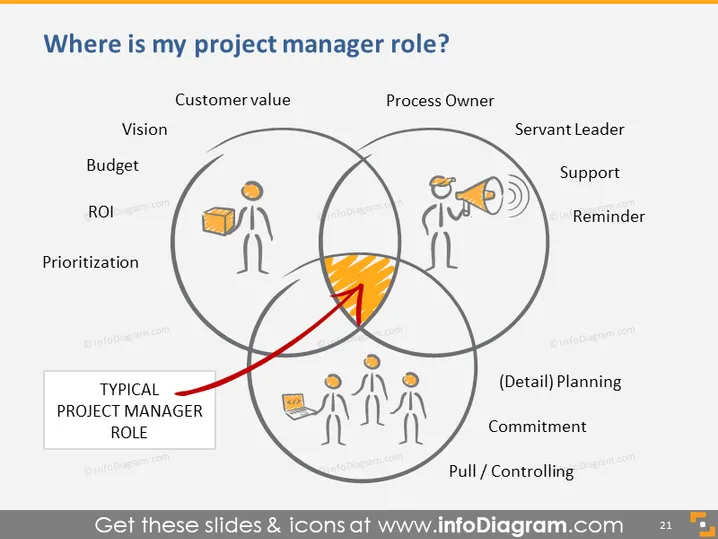
La diapositive PowerPoint intitulée "Où est mon rôle de chef de projet ?" introduit le sujet des divers rôles et responsabilités d'un chef de projet. La diapositive utilise un diagramme de Venn avec trois cercles superposés pour visualiser l'intersection des différents aspects de la gestion de projet. Les étiquettes "Valeur client", "Propriétaire de processus" et "Leader serviteur" suggèrent trois domaines clés d'intérêt pour les chefs de projet. Sous chaque en-tête, des concepts connexes sont listés : Vision, Budget, ROI, Priorisation ; Soutien, Rappel ; (Détail) Planification, Engagement. Le point d'intersection est mis en évidence, suggérant que c'est là que les rôles typiques d'un chef de projet se rencontrent.
La composition visuelle de la diapositive se concentre sur des représentations graphiques simples mais efficaces pour transmettre le rôle multifacette d'un chef de projet. L'utilisation d'icônes et l'intersection mise en évidence captent l'attention et aident à comprendre le concept.



