

Your graphics add a nice touch to my presentations and I recently used them for one of my all-hands meetings. Your toolbox adds professionalism to my slides. Instead of using standard clipart.
Claude Jones, Director of Engineer, @Walmartlabs, USA

Your graphics add a nice touch to my presentations and I recently used them for one of my all-hands meetings. Your toolbox adds professionalism to my slides. Instead of using standard clipart.
Claude Jones, Director of Engineer, @Walmartlabs, USA
I needed a fresh look at some of my slides. I've tried to find a way to create a paintbrush effect, to underline, accentuate, add some color and the handwritten markers were just the things. Very easy to use, easy to size, change the color. It was an affordable, perfect solution and I'm happy to recommend it.
Anonymous, US
The crisp, clean look of the graphics, and the fact that it allowed me to easily edit and change the colors to match the template was my main reason for purchasing them.
Brandie Jenkins, E-learning Developer, USA
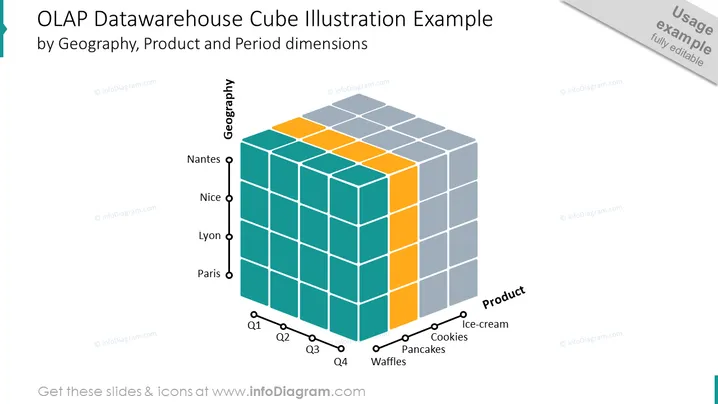
Le diapositive d'illustration du cube OLAP Datawarehouse vous permet d'analyser des données ayant plusieurs attributs ou dimensions. Chaque dimension du cube représente un attribut différent des données, et le cube vous permet de segmenter et d'organiser les données en fonction de différentes combinaisons de ces attributs. Cela peut vous aider à acquérir des perspectives et à prendre des décisions plus éclairées basées sur les données. Cette diapositive PPT fait partie du jeu de diapositives du diagramme de cube 3D. Cliquez sur l'image pour voir l'ensemble de la présentation. Vous pouvez télécharger ce modèle PPT sur Google Slides et Keynote. ## Diapositive d'Illustration du Cube OLAP Datawarehouse infographie Arrière-plan blanc, Illustration colorée du Cube OLAP Datawarehouse.



