

Your graphics add a nice touch to my presentations and I recently used them for one of my all-hands meetings. Your toolbox adds professionalism to my slides. Instead of using standard clipart.
Claude Jones, Director of Engineer, @Walmartlabs, USA

Your graphics add a nice touch to my presentations and I recently used them for one of my all-hands meetings. Your toolbox adds professionalism to my slides. Instead of using standard clipart.
Claude Jones, Director of Engineer, @Walmartlabs, USA
I needed a fresh look at some of my slides. I've tried to find a way to create a paintbrush effect, to underline, accentuate, add some color and the handwritten markers were just the things. Very easy to use, easy to size, change the color. It was an affordable, perfect solution and I'm happy to recommend it.
Anonymous, US
The crisp, clean look of the graphics, and the fact that it allowed me to easily edit and change the colors to match the template was my main reason for purchasing them.
Brandie Jenkins, E-learning Developer, USA
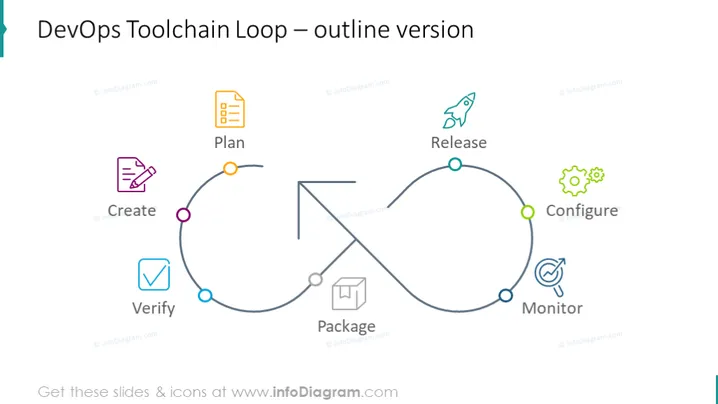
La diapositive présente la "Boucle d'outils DevOps" sous une forme esquissée. Elle représente un flux de travail circulaire avec six phases : Planifier, Créer, Vérifier, Emballer, Publier, Configurer et Surveiller. "Planifier" implique la stratégie et la conceptualisation du produit. "Créer" fait référence au développement de logiciels. "Vérifier" signifie tester le logiciel pour s'assurer qu'il respecte les normes requises. "Emballer" comprend l'assemblage du logiciel pour publication. "Publier" représente le déploiement en production. "Configurer" implique la mise en place du logiciel dans son environnement respectif. "Surveiller" consiste à observer le logiciel en fonctionnement pour détecter et résoudre les problèmes.
Le design global de la diapositive est propre et moderne, avec une utilisation minimale de couleur pour garder le focus sur le processus. La boucle circulaire suggère un cycle continu et itératif, en accord avec le concept des pratiques DevOps permanentes.



