
Commentaires
Your graphics add a nice touch to my presentations and I recently used them for one of my all-hands meetings. Your toolbox adds professionalism to my slides. Instead of using standard clipart.
I needed a fresh look at some of my slides. I've tried to find a way to create a paintbrush effect, to underline, accentuate, add some color and the handwritten markers were just the things. Very easy to use, easy to size, change the color. It was an affordable, perfect solution and I'm happy to recommend it.
The crisp, clean look of the graphics, and the fact that it allowed me to easily edit and change the colors to match the template was my main reason for purchasing them.
Description
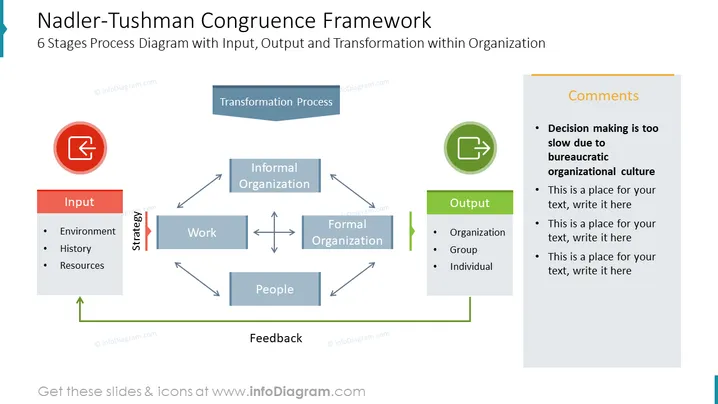
Description de la diapositive : Cette diapositive est un exemple du cadre du Modèle de Congruence de Nadler-Tushman. Elle présente le processus de transformation au sein d'une organisation. Entrée - Environnement, Histoire et Ressources. Stratégie, Travail, Organisation Formelle, Organisation Informelle, Travail, Personnes. Retour d'information, Sortie - Organisation, Groupe, Individu. ## Description de l'infographie de la diapositive : Blocs de texte infographique, Blocs de diagramme de flux, Icône vectorielle Flèche vers le haut à l'intérieur d'un carré, Icône de sortie de carré, Icône d'entrée, Icône de sortie, Vecteur de diviseur vertical, Icône de flèche, Icône ronde, Icône de cercle à contour plat, Boîte infographique rectangulaire.
Comment éditer
Comment modifier le texte et les couleurs

Comment développer / raccourcir un diagramme

Comment remplacer les icônes dans infoDiagram PPT


