Before After Comparison Scribble 3 Text Boxes

Slide Content

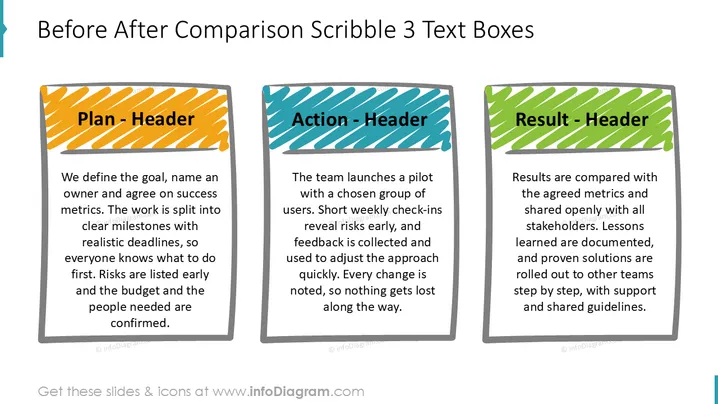
This slide outlines a three-stage process for project management, detailing the "Plan," "Action," and "Result" phases. The "Plan" stage involves defining goals, assigning ownership, setting metrics, milestones, and identifying risks and resources. The "Action" phase describes launching a pilot, conducting weekly check-ins, collecting feedback for adjustments, and noting changes. Finally, the "Result" stage focuses on comparing outcomes against metrics, sharing with stakeholders, documenting lessons, and rolling out proven solutions to other teams.

Graphical Look

  • The slide has a clean, white background with a thin teal blue bar on the left side.
  • The title "Before After Comparison Scribble 3 Text Boxes" is in a large, bold, black sans-serif font centered at the top of the slide.
  • Three rectangular boxes, resembling handwritten notes or sticky notes, are arranged horizontally across the slide.
  • Each box has a thick, irregular, gray, hand-drawn outline, giving them a "scribbled" appearance.
  • The top section of each box serves as a header, featuring a hand-drawn, scribbled fill in a distinct color:
    • The first box has an orange scribbled header.
    • The second box has a teal blue scribbled header.
    • The third box has a lime green scribbled header.
  • Inside each header, the text "Plan - Header", "Action - Header", and "Result - Header" respectively, are written in a bold, black sans-serif font.
  • Below the header in each box is a body of text, presented in a smaller, black sans-serif font, justified to the left.

The overall look is playful and informal, designed to visually represent steps or concepts in a clear, yet approachable manner. The scribbled elements add a unique, personalized touch to the structured information.

Use Cases

  • Project Management Updates: To clearly outline project phases from planning to execution and outcomes.
  • Process Improvement Initiatives: To explain new or revised workflows and their expected stages.
  • Training and Onboarding: To present step-by-step guides or learning modules in an engaging format.
  • Comparative Analysis: To highlight changes or progress over time by showing a "before" (Plan), "during" (Action), and "after" (Result) scenario.
Before After Comparison Scribble 3 Text Boxes

Before After Comparison Scribble 3 Text Boxes

Part of deckInfographies dessinées à la main, diagrammes et symboles griffonnés (formes PPT)