

Your graphics add a nice touch to my presentations and I recently used them for one of my all-hands meetings. Your toolbox adds professionalism to my slides. Instead of using standard clipart.
Claude Jones, Director of Engineer, @Walmartlabs, USA

Your graphics add a nice touch to my presentations and I recently used them for one of my all-hands meetings. Your toolbox adds professionalism to my slides. Instead of using standard clipart.
Claude Jones, Director of Engineer, @Walmartlabs, USA
I needed a fresh look at some of my slides. I've tried to find a way to create a paintbrush effect, to underline, accentuate, add some color and the handwritten markers were just the things. Very easy to use, easy to size, change the color. It was an affordable, perfect solution and I'm happy to recommend it.
Anonymous, US
The crisp, clean look of the graphics, and the fact that it allowed me to easily edit and change the colors to match the template was my main reason for purchasing them.
Brandie Jenkins, E-learning Developer, USA
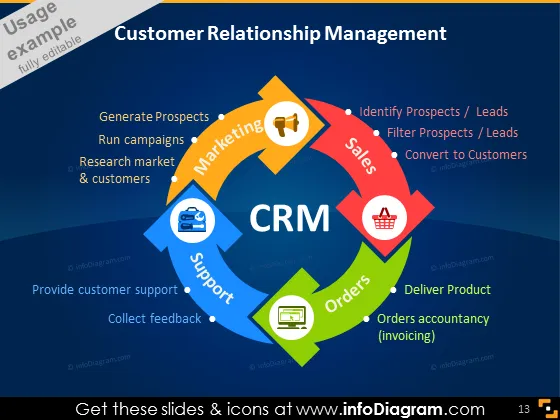
La diapositiva de PowerPoint presenta una visión general de la Gestión de Relaciones con Clientes (CRM) dividiéndola en cuatro componentes interrelacionados: "Marketing," "Ventas," "Soporte," y "Pedidos." "Marketing" implica generar prospectos, ejecutar campañas e investigar mercados y clientes. El proceso de "Ventas" incluye la identificación y filtrado de prospectos o leads, con el objetivo final de convertirlos en clientes. "Soporte" se centra en proporcionar asistencia al cliente y recopilar comentarios para mejorar el servicio. Finalmente, "Pedidos" involucra la entrega del producto y la gestión de la contabilidad de los pedidos (facturación), lo cual es vital para la finalización de las transacciones y el reconocimiento de ingresos.



