

Your graphics add a nice touch to my presentations and I recently used them for one of my all-hands meetings. Your toolbox adds professionalism to my slides. Instead of using standard clipart.
Claude Jones, Director of Engineer, @Walmartlabs, USA

Your graphics add a nice touch to my presentations and I recently used them for one of my all-hands meetings. Your toolbox adds professionalism to my slides. Instead of using standard clipart.
Claude Jones, Director of Engineer, @Walmartlabs, USA
I needed a fresh look at some of my slides. I've tried to find a way to create a paintbrush effect, to underline, accentuate, add some color and the handwritten markers were just the things. Very easy to use, easy to size, change the color. It was an affordable, perfect solution and I'm happy to recommend it.
Anonymous, US
The crisp, clean look of the graphics, and the fact that it allowed me to easily edit and change the colors to match the template was my main reason for purchasing them.
Brandie Jenkins, E-learning Developer, USA
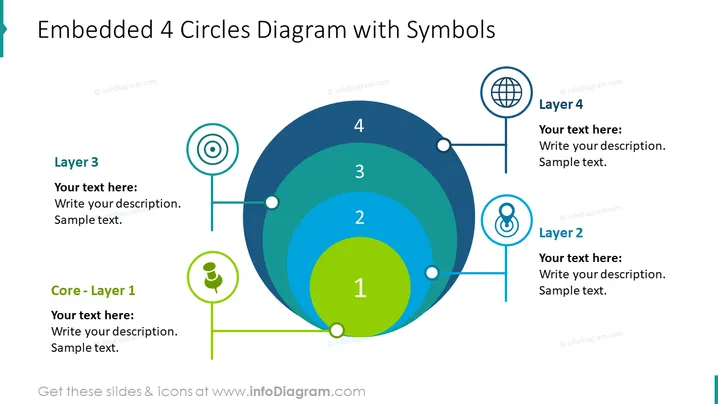
Die Folie zeigt einen mehrschichtigen Ansatz zu einem Konzept, System oder Prozess, beginnend mit einem Kernelement (Ebene 1) und sich nach außen bis zur Ebene 4 ausdehnend. Kern - Ebene 1 ist der zentrale Punkt, der auf den grundlegenden Teil des Themas hinweist. Ebene 2 deutet auf eine direkte Erweiterung oder Folge der zentralen Idee hin. Ebene 3 repräsentiert eine weitere Reichweite vom zentralen Konzept, möglicherweise einen erweiterten Einfluss oder Anwendungsbereich. Ebene 4 ist die äußerste Schicht, die möglicherweise die weitreichendsten Implikationen oder das Endergebnis der Fortschritte vom Kern anzeigt.
Das Gesamtbild der Folie ist sauber und professionell, mit einem strukturierten Layout, das den Betrachter visuell durch die Schichten führt. Der Einsatz von Farbverläufen und Symbolen verleiht den ansonsten einfachen grafischen Elementen eine dynamische Qualität.



