
Your graphics add a nice touch to my presentations and I recently used them for one of my all-hands meetings. Your toolbox adds professionalism to my slides. Instead of using standard clipart.
Claude Jones, Director of Engineer, @Walmartlabs, USA

Your graphics add a nice touch to my presentations and I recently used them for one of my all-hands meetings. Your toolbox adds professionalism to my slides. Instead of using standard clipart.
Claude Jones, Director of Engineer, @Walmartlabs, USA

I needed a fresh look at some of my slides. I've tried to find a way to create a paintbrush effect, to underline, accentuate, add some color and the handwritten markers were just the things. Very easy to use, easy to size, change the color. It was an affordable, perfect solution and I'm happy to recommend it.
Anonymous, US
The crisp, clean look of the graphics, and the fact that it allowed me to easily edit and change the colors to match the template was my main reason for purchasing them.
Brandie Jenkins, E-learning Developer, USA
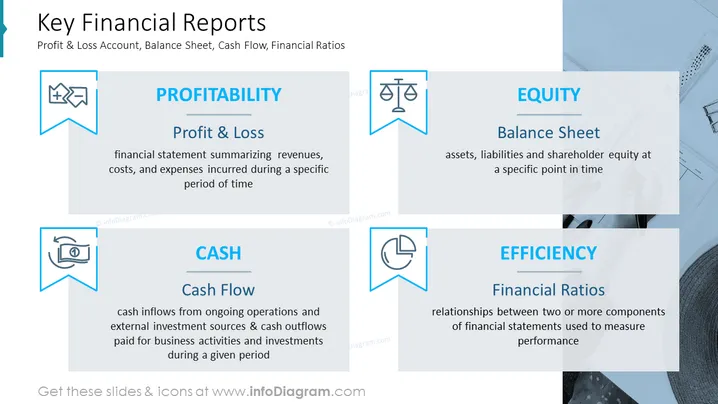
Die PowerPoint-Folie handelt von den vier wichtigsten Finanzberichten: Gewinn- und Verlustrechnung, Bilanz, Cashflow und Effizienzzahlen. Die Gewinn- und Verlustrechnung ist ein Finanzbericht, der die Einnahmen, Kosten und Aufwendungen während eines bestimmten Zeitraums zusammenfasst. Die Bilanz ist ein Snapshot der finanziellen Position eines Unternehmens zu einem bestimmten Zeitpunkt und zeigt Vermögenswerte, Verbindlichkeiten und das Eigenkapital der Aktionäre. Die Cashflow-Rechnung zeigt die Geldzuflüsse aus laufenden Betrieben und externen Investitionsquellen sowie die Geldabflüsse, die für Geschäftstätigkeiten und Investitionen bezahlt werden. Effizienzzahlen sind Finanzkennzahlen, die die operative Leistung eines Unternehmens messen.
Sie können eine solche Folie in verschiedenen settings verwenden, wie zum Beispiel:


