
Your graphics add a nice touch to my presentations and I recently used them for one of my all-hands meetings. Your toolbox adds professionalism to my slides. Instead of using standard clipart.
Claude Jones, Director of Engineer, @Walmartlabs, USA
Your graphics add a nice touch to my presentations and I recently used them for one of my all-hands meetings. Your toolbox adds professionalism to my slides. Instead of using standard clipart.
Claude Jones, Director of Engineer, @Walmartlabs, USA
I needed a fresh look at some of my slides. I've tried to find a way to create a paintbrush effect, to underline, accentuate, add some color and the handwritten markers were just the things. Very easy to use, easy to size, change the color. It was an affordable, perfect solution and I'm happy to recommend it.
Anonymous, US
The crisp, clean look of the graphics, and the fact that it allowed me to easily edit and change the colors to match the template was my main reason for purchasing them.
Brandie Jenkins, E-learning Developer, USA
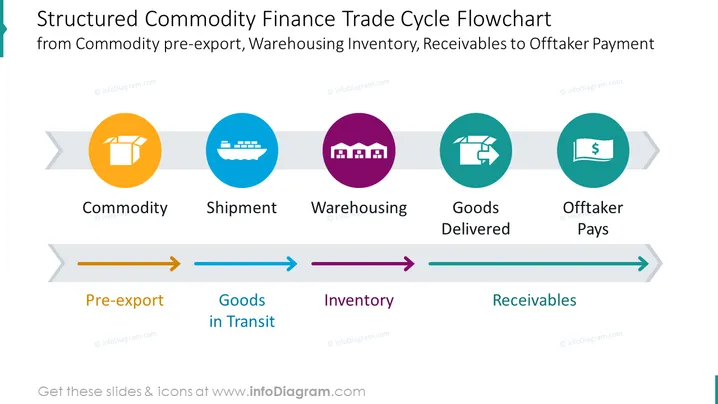
Nutzen Sie dieses strukturierte Flussdiagramm in PowerPoint, um den Handelsfluss von Waren darzustellen, wie z.B. Vorexport, Waren im Transit, Inventar und Forderungen. Symbolisieren Sie mit aussagekräftigen Symbolen die folgenden Phasen des Prozesses: Ware, Versand, Lagerung, ausgelieferte Waren und der Abnehmer bezahlt. Erfahren Sie mehr über Handelsfinanzierung auf Wikipedia.
Diese USA Globale Handelsexportrouten auf Weltkarte mit Pfeilen, Pins und Flaggen Infografik ist Teil unserer PPT-Vorlage für Handelsfinanzierungspräsentationen.




