
Your graphics add a nice touch to my presentations and I recently used them for one of my all-hands meetings. Your toolbox adds professionalism to my slides. Instead of using standard clipart.
Claude Jones, Director of Engineer, @Walmartlabs, USA

Your graphics add a nice touch to my presentations and I recently used them for one of my all-hands meetings. Your toolbox adds professionalism to my slides. Instead of using standard clipart.
Claude Jones, Director of Engineer, @Walmartlabs, USA

I needed a fresh look at some of my slides. I've tried to find a way to create a paintbrush effect, to underline, accentuate, add some color and the handwritten markers were just the things. Very easy to use, easy to size, change the color. It was an affordable, perfect solution and I'm happy to recommend it.
Anonymous, US
The crisp, clean look of the graphics, and the fact that it allowed me to easily edit and change the colors to match the template was my main reason for purchasing them.
Brandie Jenkins, E-learning Developer, USA
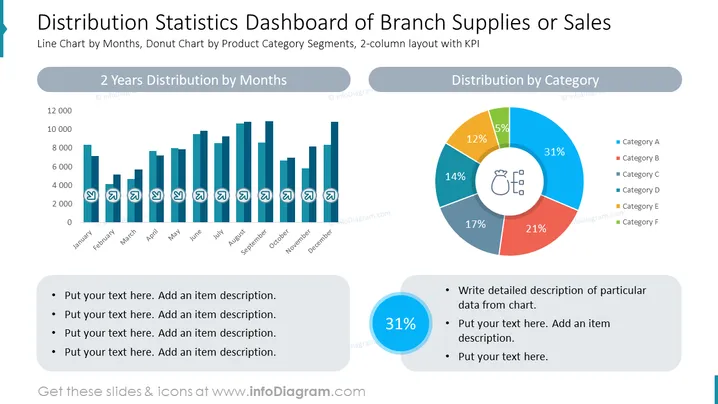
Die PowerPoint-Folie mit dem Titel "Vertriebsstatistiken-Dashboard für Filialen oder Verkäufe" präsentiert einen visuellen Vergleich statistischer Daten über ein Balkendiagramm mit der Bezeichnung "Verteilung über 2 Jahre nach Monaten" und ein Donutdiagramm unter der Überschrift "Verteilung nach Kategorien". Jedes Diagramm wird von einer Legende begleitet, die Kategorien oder Kennzahlen detailliert beschreibt. Aufzählungspunkte unter beiden Diagrammen bieten Platz für zusätzliche Beschreibungen. Diese Folie soll komplexe Daten in einem visuell verdaulichen Format zusammenfassen und effektiv Muster und Verhältnisse in der Datenverteilung über die Zeit und verschiedene Produktkategorien kommunizieren.
Die Folie hat ein sauberes, professionelles Erscheinungsbild mit einem harmonischen Gleichgewicht zwischen grafischen und textlichen Informationen. Der Einsatz von Farbe ist funktional und hilft, verschiedene Datensegmente zu unterscheiden, und die Symbole fügen eine Ebene visueller Anziehung hinzu.


