
Your graphics add a nice touch to my presentations and I recently used them for one of my all-hands meetings. Your toolbox adds professionalism to my slides. Instead of using standard clipart.
Claude Jones, Director of Engineer, @Walmartlabs, USA

Your graphics add a nice touch to my presentations and I recently used them for one of my all-hands meetings. Your toolbox adds professionalism to my slides. Instead of using standard clipart.
Claude Jones, Director of Engineer, @Walmartlabs, USA
I needed a fresh look at some of my slides. I've tried to find a way to create a paintbrush effect, to underline, accentuate, add some color and the handwritten markers were just the things. Very easy to use, easy to size, change the color. It was an affordable, perfect solution and I'm happy to recommend it.
Anonymous, US
The crisp, clean look of the graphics, and the fact that it allowed me to easily edit and change the colors to match the template was my main reason for purchasing them.
Brandie Jenkins, E-learning Developer, USA
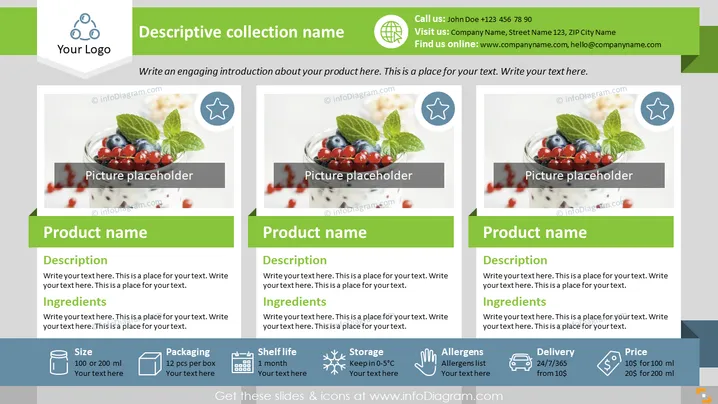
Die PowerPoint-Folie scheint Teil eines Produktkatalogs oder einer Produktpräsentation zu sein, die einzelne Lebensmittelprodukte vorstellt. Jeder Produktabschnitt enthält einen "Produktnamen" mit einer "Beschreibung" und "Zutaten", die darunter aufgeführt sind und die Eigenschaften und Inhalte des Produkts detaillieren. Icons für "Größe", "Verpackung", "Haltbarkeit", "Lagerung", "Allergene", "Lieferung" und "Preis" bieten praktische Informationen. Diese Icons geben die Volumenoptionen des Produkts, den Verpackungstyp, die Haltbarkeit, Lageranforderungen, potenzielle Allergene, Lieferbedingungen und Kosten an - wichtige Details für Einzelhändler oder Verbraucher, die das Produkt in Betracht ziehen.
Die Folie ist mit einem klaren, organisierten Layout gestaltet und nutzt visuelle Elemente wie Icons und Bilder, um einen ansprechenden Überblick über die Produkte zu schaffen. Das Farbschema ist professionell und unaufdringlich, was die Informationen leicht zugänglich macht.