
Your graphics add a nice touch to my presentations and I recently used them for one of my all-hands meetings. Your toolbox adds professionalism to my slides. Instead of using standard clipart.
Claude Jones, Director of Engineer, @Walmartlabs, USA

Your graphics add a nice touch to my presentations and I recently used them for one of my all-hands meetings. Your toolbox adds professionalism to my slides. Instead of using standard clipart.
Claude Jones, Director of Engineer, @Walmartlabs, USA
I needed a fresh look at some of my slides. I've tried to find a way to create a paintbrush effect, to underline, accentuate, add some color and the handwritten markers were just the things. Very easy to use, easy to size, change the color. It was an affordable, perfect solution and I'm happy to recommend it.
Anonymous, US
The crisp, clean look of the graphics, and the fact that it allowed me to easily edit and change the colors to match the template was my main reason for purchasing them.
Brandie Jenkins, E-learning Developer, USA
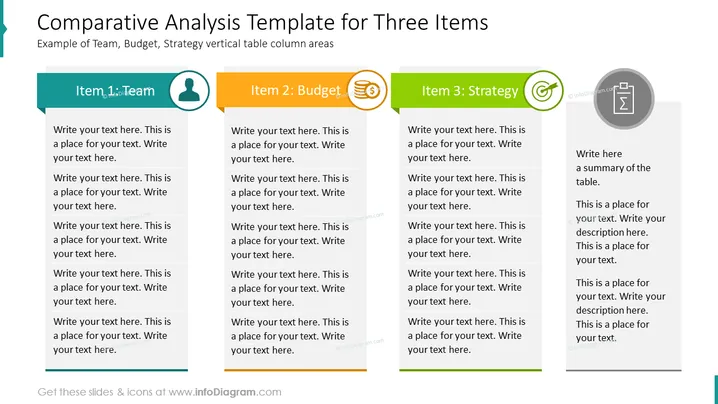
Die PowerPoint-Folie ist so gestaltet, dass sie eine Vergleichsanalyse von drei verschiedenen Aspekten erleichtert: Team, Budget und Strategie. Jede Kategorie ist in ihre eigene Spalte unterteilt, wobei "Element 1: Team" ein Personen-Symbol zeigt, "Element 2: Budget" ein Geldsymbol darstellt und "Element 3: Strategie" ein Zahnrad-Symbol präsentiert. Unter jedem Titel befinden sich mehrere Aufzählungspunkte, in denen spezifische Details oder Anmerkungen hinzugefügt werden können, um jedes Element gründlich zu beschreiben. In der Box ganz rechts gibt es einen Raum, um eine Zusammenfassung der Tabelle zu schreiben, was einen Überblick oder eine Synthese der in den drei Spalten präsentierten Informationen ermöglicht.