
Your graphics add a nice touch to my presentations and I recently used them for one of my all-hands meetings. Your toolbox adds professionalism to my slides. Instead of using standard clipart.
Claude Jones, Director of Engineer, @Walmartlabs, USA
Your graphics add a nice touch to my presentations and I recently used them for one of my all-hands meetings. Your toolbox adds professionalism to my slides. Instead of using standard clipart.
Claude Jones, Director of Engineer, @Walmartlabs, USA
I needed a fresh look at some of my slides. I've tried to find a way to create a paintbrush effect, to underline, accentuate, add some color and the handwritten markers were just the things. Very easy to use, easy to size, change the color. It was an affordable, perfect solution and I'm happy to recommend it.
Anonymous, US
The crisp, clean look of the graphics, and the fact that it allowed me to easily edit and change the colors to match the template was my main reason for purchasing them.
Brandie Jenkins, E-learning Developer, USA
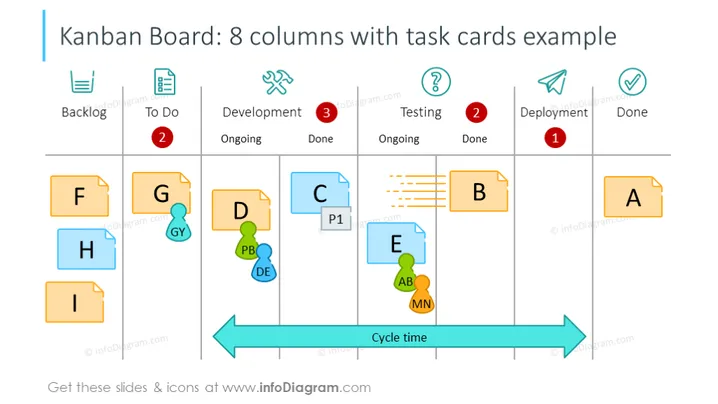
Diese PowerPoint-Folie mit dem Titel "Kanban-Board: Beispiel mit 8 Spalten und Aufgaben-Karten" veranschaulicht einen Beispiel-Workflow für ein Kanban-Board, das sich über acht Phasen erstreckt: Rückstand, To Do, Entwicklung läuft, Entwicklung abgeschlossen, Testing läuft, Testing abgeschlossen, Bereitstellung und Erledigt. Jede Spalte enthält "Aufgaben-Karten", die Arbeitsgegenstände in verschiedenen Phasen darstellen, mit farbcodierten Etiketten, Prioritätsmarkierungen und Fortschrittsanzeigen. Diese Aufgaben-Karten helfen, den Arbeitsfortschritt zu visualisieren und Engpässe im Workflow zu identifizieren.
Die Folie ist visuell ansprechend und strukturiert, verwendet konsistente visuelle Hinweise und Icons, um die Verständlichkeit zu verbessern. Ihre farbcodierten Aufgaben-Karten und klaren Spaltenbeschriftungen präsentieren eine klare und ansprechende Möglichkeit, den Status und den Fortschritt im Workflow darzustellen.




