

Your graphics add a nice touch to my presentations and I recently used them for one of my all-hands meetings. Your toolbox adds professionalism to my slides. Instead of using standard clipart.
Claude Jones, Director of Engineer, @Walmartlabs, USA

Your graphics add a nice touch to my presentations and I recently used them for one of my all-hands meetings. Your toolbox adds professionalism to my slides. Instead of using standard clipart.
Claude Jones, Director of Engineer, @Walmartlabs, USA
I needed a fresh look at some of my slides. I've tried to find a way to create a paintbrush effect, to underline, accentuate, add some color and the handwritten markers were just the things. Very easy to use, easy to size, change the color. It was an affordable, perfect solution and I'm happy to recommend it.
Anonymous, US
The crisp, clean look of the graphics, and the fact that it allowed me to easily edit and change the colors to match the template was my main reason for purchasing them.
Brandie Jenkins, E-learning Developer, USA
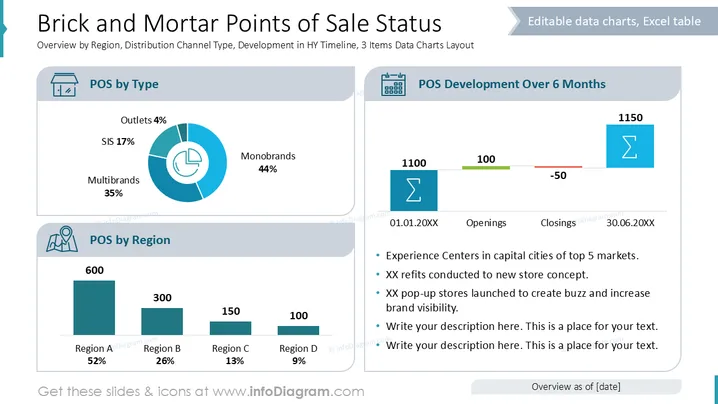
Die Folie bietet einen Überblick über den Status der Verkaufsstellen (POS) nach Typ, Region und Entwicklung. "POS nach Typ" zeigt Prozentsätze der Verkaufsstellen (4%), SIS (17%), Multibrands (35%) und Monobrands (44%). "POS nach Region" zeigt ein Balkendiagramm mit der Verteilung der POS in den Regionen A (52%), B (26%), C (13%) und D (9%). "POS-Entwicklung über 6 Monate" gibt die Gesamtzahl der Eröffnungen (100) und Schließungen (-50) an, was zu einer Nettoveränderung von 1150 POS führt mit Einträgen zu aktuellen Experimenten zur Verbesserung der Sichtbarkeit.
Die Folie hat ein sauberes und professionelles Design mit klarer Trennung der Inhalte durch Diagramme und Icons. Daten sind visuell leicht interpretierbar dank organisierter Abschnitte und unterschiedlicher Farben.



