
Your graphics add a nice touch to my presentations and I recently used them for one of my all-hands meetings. Your toolbox adds professionalism to my slides. Instead of using standard clipart.
Claude Jones, Director of Engineer, @Walmartlabs, USA
Your graphics add a nice touch to my presentations and I recently used them for one of my all-hands meetings. Your toolbox adds professionalism to my slides. Instead of using standard clipart.
Claude Jones, Director of Engineer, @Walmartlabs, USA
I needed a fresh look at some of my slides. I've tried to find a way to create a paintbrush effect, to underline, accentuate, add some color and the handwritten markers were just the things. Very easy to use, easy to size, change the color. It was an affordable, perfect solution and I'm happy to recommend it.
Anonymous, US
The crisp, clean look of the graphics, and the fact that it allowed me to easily edit and change the colors to match the template was my main reason for purchasing them.
Brandie Jenkins, E-learning Developer, USA
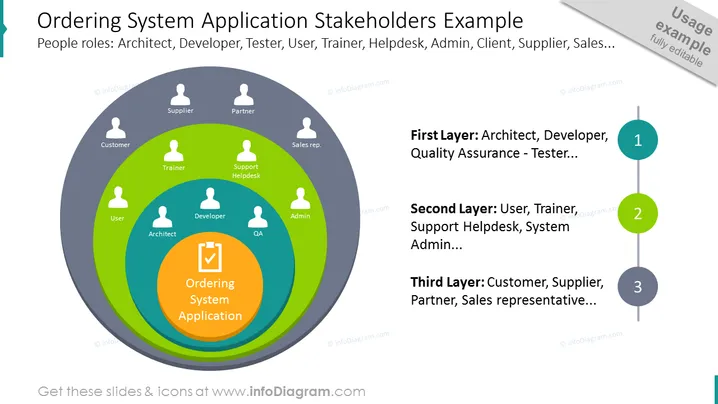
##Folieninhalt: Infografikfolie mit Anwendung des Bestellsystems Beispiel für Beteiligte. Die Rollen der Personen werden mit einem Schichtdiagramm dargestellt. In der Kernschicht haben wir die Anwendung des Bestellsystems, dann besteht die erste Schicht aus Personen, die direkt an der Produktion beteiligt sind, wie dem Architekten, Entwickler und QA. Die zweite Schicht zeigt den Benutzer, Trainer, Support-Helpdesk und Administrator, und die äußere Schicht – den Kunden, Lieferanten, Partner und Vertriebsmitarbeiter. Auf der rechten Seite haben wir Platz für eine kurze Beschreibung gelassen, in der Sie die beteiligten Personen und Institutionen in jeder Schicht benennen können. Klicken Sie auf das Bild, um weitere Ideen zur Stakeholder-Analyse in der Infografik zu sehen. ##Infografikbeschreibung der Folie: Zwiebel-Diagramm, Männerumriss-Ikon, Farb Kodierung, Checklisten-Umriss-Ikon, Linien-Vektor, Berührungspunkte, flaches Umriss Aufzählungsikon




