

Your graphics add a nice touch to my presentations and I recently used them for one of my all-hands meetings. Your toolbox adds professionalism to my slides. Instead of using standard clipart.
Claude Jones, Director of Engineer, @Walmartlabs, USA

Your graphics add a nice touch to my presentations and I recently used them for one of my all-hands meetings. Your toolbox adds professionalism to my slides. Instead of using standard clipart.
Claude Jones, Director of Engineer, @Walmartlabs, USA
I needed a fresh look at some of my slides. I've tried to find a way to create a paintbrush effect, to underline, accentuate, add some color and the handwritten markers were just the things. Very easy to use, easy to size, change the color. It was an affordable, perfect solution and I'm happy to recommend it.
Anonymous, US
The crisp, clean look of the graphics, and the fact that it allowed me to easily edit and change the colors to match the template was my main reason for purchasing them.
Brandie Jenkins, E-learning Developer, USA
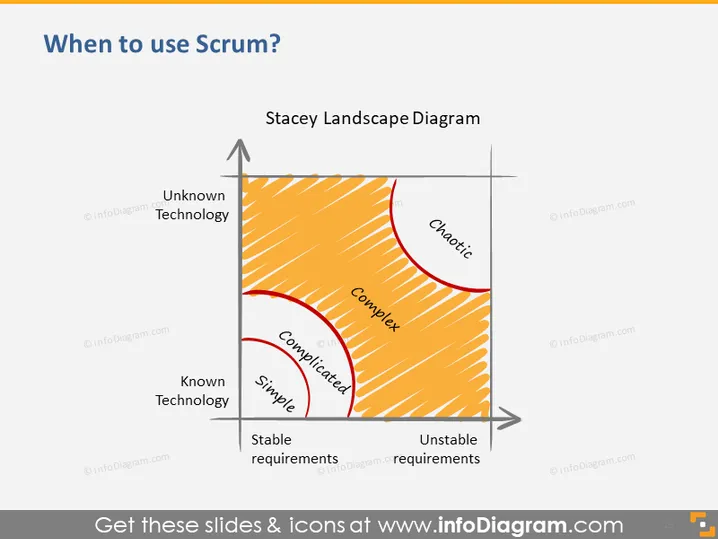
Diese PowerPoint-Folie ist eine Darstellung der Stacey-Matrix, die auch als Stacey-Landschaftsdiagramm bezeichnet wird. Das Diagramm katalogisiert Projekte oder Initiativen anhand von zwei Achsen – bekannte bis unbekannte Technologie (vertikal) und stabile bis instabile Anforderungen (horizontal). Es ist in vier Quadranten unterteilt: Einfach, Kompliziert, Komplex und Chaotisch, wobei jeder Quadrant den Grad der Unsicherheit und das Maß an Kohärenz zwischen Anforderungen und Technologie vorschlägt.
Die Folie hat ein sauberes und professionelles Aussehen, wobei das Diagramm im Mittelpunkt steht. Die verwendeten Farben für die Schattierung erzeugen einen Verlaufseffekt, der visuell zwischen verschiedenen Graden der Projektkomplexität und Technologievertrautheit unterscheidet.



