

Your graphics add a nice touch to my presentations and I recently used them for one of my all-hands meetings. Your toolbox adds professionalism to my slides. Instead of using standard clipart.
Claude Jones, Director of Engineer, @Walmartlabs, USA

Your graphics add a nice touch to my presentations and I recently used them for one of my all-hands meetings. Your toolbox adds professionalism to my slides. Instead of using standard clipart.
Claude Jones, Director of Engineer, @Walmartlabs, USA
I needed a fresh look at some of my slides. I've tried to find a way to create a paintbrush effect, to underline, accentuate, add some color and the handwritten markers were just the things. Very easy to use, easy to size, change the color. It was an affordable, perfect solution and I'm happy to recommend it.
Anonymous, US
The crisp, clean look of the graphics, and the fact that it allowed me to easily edit and change the colors to match the template was my main reason for purchasing them.
Brandie Jenkins, E-learning Developer, USA
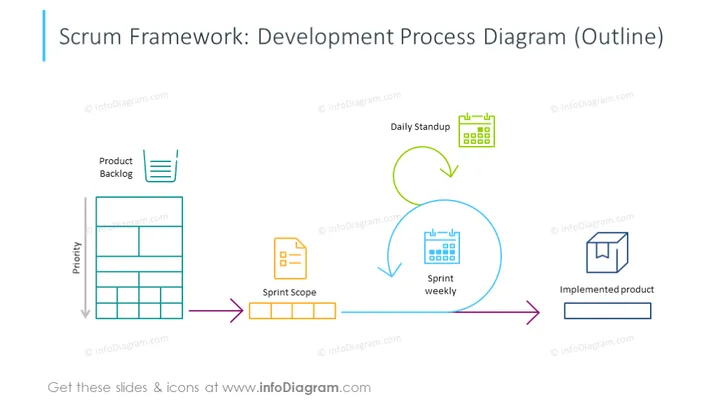
##Folieninhalt: Diese Scrum-Entwicklungsmodell-Folie ist in mehrere agile Arbeitsabläufe unterteilt. Priorität - eine dringende Aufgabe, die zuerst erledigt werden sollte, und basierend darauf wird sie oben auf das Produkt-Backlog gesetzt; Sprintumfang - wichtige Anforderungen auf hoher Ebene; Sprint-Woche - das gesamte Scrum-Team arbeitet zusammen, um Funktionen basierend auf den User Stories hinzuzufügen; Tägliches Stand-Up - das agile Scrum-Team bespricht die erledigte Arbeit des vorherigen Tages und diskutiert, was noch getan werden kann; Implementiertes Produkt - das Endziel. Sie können diese Folie in hoher Qualität herunterladen und alle Symbole und Formen nach Bedarf anpassen. ##Foliensgrafikbeschreibung: Vektor-Diagramm, Umrisssymbole, farbenfrohe Pfeilverktoren, Kalender-Symbole, 3D-Box-Symbol, Tischsymbol, rechteckige Formen



