
Your graphics add a nice touch to my presentations and I recently used them for one of my all-hands meetings. Your toolbox adds professionalism to my slides. Instead of using standard clipart.
Claude Jones, Director of Engineer, @Walmartlabs, USA
Your graphics add a nice touch to my presentations and I recently used them for one of my all-hands meetings. Your toolbox adds professionalism to my slides. Instead of using standard clipart.
Claude Jones, Director of Engineer, @Walmartlabs, USA
I needed a fresh look at some of my slides. I've tried to find a way to create a paintbrush effect, to underline, accentuate, add some color and the handwritten markers were just the things. Very easy to use, easy to size, change the color. It was an affordable, perfect solution and I'm happy to recommend it.
Anonymous, US
The crisp, clean look of the graphics, and the fact that it allowed me to easily edit and change the colors to match the template was my main reason for purchasing them.
Brandie Jenkins, E-learning Developer, USA
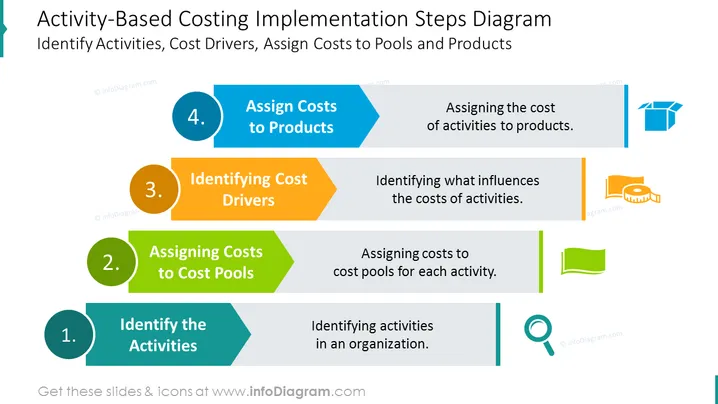
Dies ist ein editierbares PowerPoint-Diagramm zur Implementierung, das die Schritte der aktivitätsbasierten Kostenrechnung veranschaulicht, wie z.B. die Zuordnung von Kosten zu Produkten, die Identifizierung von Kostentreibern, die Zuordnung von Kosten zu Kostenpools und die Identifizierung der Aktivitäten. Verwenden Sie die angegebenen Beispiele oder passen Sie sie an Ihre spezifischen Geschäftszwecke an. Erfahren Sie mehr über aktivitätsbasierte Kostenrechnung auf Wikipedia.
Dieses Diagramm der Schritte zur Implementierung der aktivitätsbasierten Kostenrechnung mit Symbolen ist Teil unseres PPT-Vorlagen für Diagramme zur aktivitätsbasierten Kostenrechnung.




