
Your graphics add a nice touch to my presentations and I recently used them for one of my all-hands meetings. Your toolbox adds professionalism to my slides. Instead of using standard clipart.
Claude Jones, Director of Engineer, @Walmartlabs, USA

Your graphics add a nice touch to my presentations and I recently used them for one of my all-hands meetings. Your toolbox adds professionalism to my slides. Instead of using standard clipart.
Claude Jones, Director of Engineer, @Walmartlabs, USA
I needed a fresh look at some of my slides. I've tried to find a way to create a paintbrush effect, to underline, accentuate, add some color and the handwritten markers were just the things. Very easy to use, easy to size, change the color. It was an affordable, perfect solution and I'm happy to recommend it.
Anonymous, US
The crisp, clean look of the graphics, and the fact that it allowed me to easily edit and change the colors to match the template was my main reason for purchasing them.
Brandie Jenkins, E-learning Developer, USA
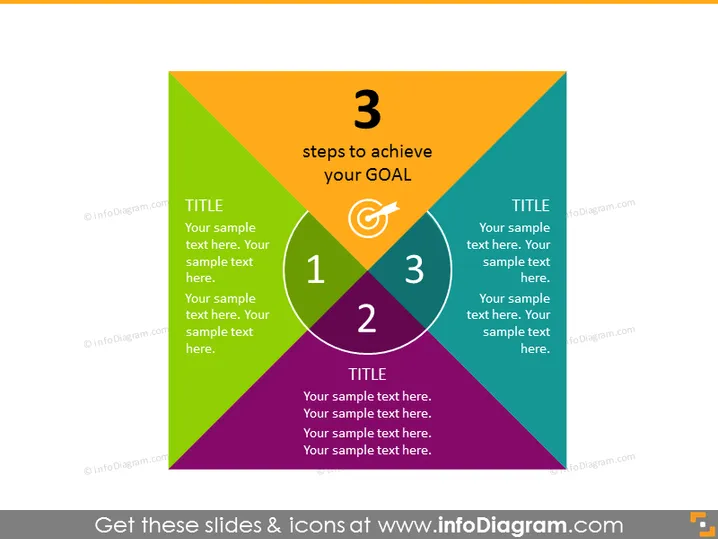
Die PowerPoint-Folie präsentiert ein Modell mit dem Titel "3 Schritte, um Ihr Ziel zu erreichen", das ein dreieckiges Diagramm zeigt, das in drei Abschnitte unterteilt ist, von denen jeder eine andere Farbe hat und jeweils einen unterschiedlichen Schritt repräsentiert. In jedem Abschnitt befindet sich eine auffällige Zahl (1, 2 oder 3), die die Reihenfolge der Schritte anzeigt, begleitet von dem Wort "TITEL" und Platzhaltertext für den Präsentierenden, um zu erläutern, was jeder Schritt beinhaltet. Diese Beschreibungen sind entscheidend, da sie die wesentlichen Phasen oder Aktionen definieren, die notwendig sind, um ein spezifisches Ziel zu erreichen.
Die Folie ist visuell dynamisch und nutzt Farbcodierung und geometrische Formen, um eine Fortschritt oder Beziehung zwischen den Konzepten anzuzeigen. Das zentrale Zielsymbol dient als besonderer Punkt, der das ultimative Ziel der detaillierten Schritte kennzeichnet.