

Your graphics add a nice touch to my presentations and I recently used them for one of my all-hands meetings. Your toolbox adds professionalism to my slides. Instead of using standard clipart.
Claude Jones, Director of Engineer, @Walmartlabs, USA

Your graphics add a nice touch to my presentations and I recently used them for one of my all-hands meetings. Your toolbox adds professionalism to my slides. Instead of using standard clipart.
Claude Jones, Director of Engineer, @Walmartlabs, USA
I needed a fresh look at some of my slides. I've tried to find a way to create a paintbrush effect, to underline, accentuate, add some color and the handwritten markers were just the things. Very easy to use, easy to size, change the color. It was an affordable, perfect solution and I'm happy to recommend it.
Anonymous, US
The crisp, clean look of the graphics, and the fact that it allowed me to easily edit and change the colors to match the template was my main reason for purchasing them.
Brandie Jenkins, E-learning Developer, USA
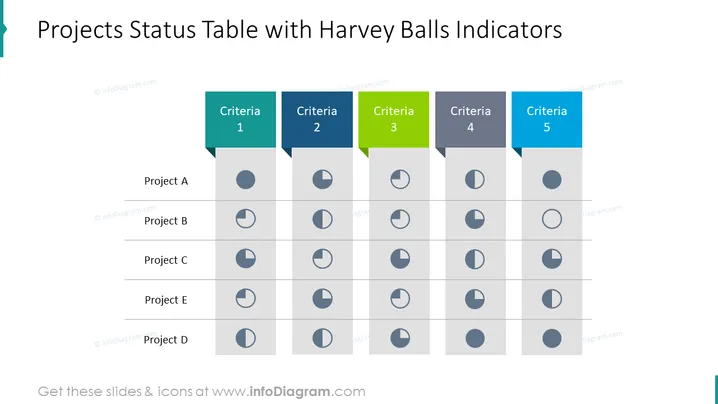
##Projektstatus Tabelle mit Harvey Balls Vorlage Folieninhalt Die Projektstatus Tabelle mit Harvey Balls Vorlage ist eine visuelle Darstellung des Fortschritts und Status verschiedener Projekte in Tabellenformat unter Verwendung von Harvey Balls als Indikatoren. Listen Sie die Namen aller Projekte auf, die Sie in der Tabelle aufnehmen möchten. Die Harvey Balls repräsentieren den Fortschritt jedes Projekts. Der vollständig ausgefüllte Kreis würde ein Projekt darstellen, das abgeschlossen ist, während ein halb ausgefüllter Kreis auf ein Projekt hinweist, das zur Hälfte abgeschlossen ist. Diese PPT-Folie ist teil des Modern Flat Diagrams Slide Decks. Klicken Sie auf das Bild, um die komplette Präsentation zu sehen. Sie können diese PPT-Vorlage auf Google Slides und Keynote herunterladen. ##Projektstatus Tabelle mit Harvey Balls Vorlage Folien-Infografiken Weißer Hintergrund, Harvey Ball Icon, Vollkreis Icon, Ganzer Kreis Icon, Eins- Viertel Icon, Drei-Viertel Icon, Halb Icon



