
Your graphics add a nice touch to my presentations and I recently used them for one of my all-hands meetings. Your toolbox adds professionalism to my slides. Instead of using standard clipart.
Claude Jones, Director of Engineer, @Walmartlabs, USA
Your graphics add a nice touch to my presentations and I recently used them for one of my all-hands meetings. Your toolbox adds professionalism to my slides. Instead of using standard clipart.
Claude Jones, Director of Engineer, @Walmartlabs, USA
I needed a fresh look at some of my slides. I've tried to find a way to create a paintbrush effect, to underline, accentuate, add some color and the handwritten markers were just the things. Very easy to use, easy to size, change the color. It was an affordable, perfect solution and I'm happy to recommend it.
Anonymous, US
The crisp, clean look of the graphics, and the fact that it allowed me to easily edit and change the colors to match the template was my main reason for purchasing them.
Brandie Jenkins, E-learning Developer, USA
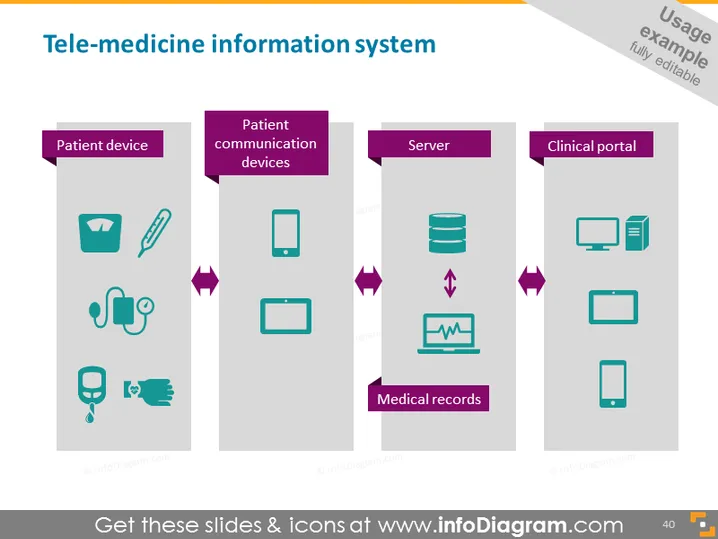
Die Folie skizziert die Komponenten eines Telemedizin-Informationssystems, das vier Hauptkategorien umfasst: "Patientengerät", "Patientenkommunikationsgeräte", "Server" und "Klinisches Portal". Jede Kategorie wird durch relevante Symbole dargestellt, die die innerhalb von Telehealth-Rahmen verwendete Technologie verdeutlichen. "Patientengerät" umfasst medizinische und Gesundheitsüberwachungswerkzeuge, "Patientenkommunikationsgeräte" bezieht sich auf Geräte für die Interaktion zwischen Patient und Anbieter, "Server" repräsentiert die Infrastruktur für Datenspeicherung und -verarbeitung, und "Klinisches Portal" fasst Plattformen für den Zugang von Gesundheitsfachkräften zusammen.
Die Folie verwendet einfache, aber effektive Grafiken, um die Struktur eines Telemedizin-Informationssystems zu vermitteln und durch visuelle Hilfsmittel ein besseres Verständnis zu gewährleisten. Die Farbwahl und die Symbolstile tragen zu einem polierten und modernen Präsentationsgefühl bei.




