
Your graphics add a nice touch to my presentations and I recently used them for one of my all-hands meetings. Your toolbox adds professionalism to my slides. Instead of using standard clipart.
Claude Jones, Director of Engineer, @Walmartlabs, USA
Your graphics add a nice touch to my presentations and I recently used them for one of my all-hands meetings. Your toolbox adds professionalism to my slides. Instead of using standard clipart.
Claude Jones, Director of Engineer, @Walmartlabs, USA
I needed a fresh look at some of my slides. I've tried to find a way to create a paintbrush effect, to underline, accentuate, add some color and the handwritten markers were just the things. Very easy to use, easy to size, change the color. It was an affordable, perfect solution and I'm happy to recommend it.
Anonymous, US
The crisp, clean look of the graphics, and the fact that it allowed me to easily edit and change the colors to match the template was my main reason for purchasing them.
Brandie Jenkins, E-learning Developer, USA
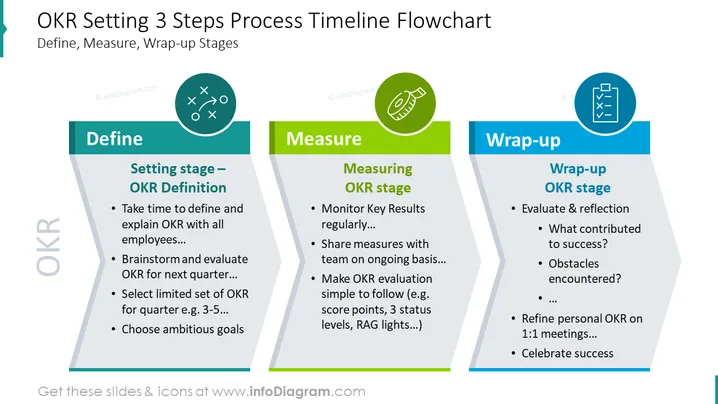
Phasen. Diese Phasen sind Definieren, Messen und Abschluss. Festlegen der Phase - Definiere OKR: Nimm dir Zeit, um OKR zu definieren und zu erklären, brainstormen und vierteljährlich bewerten und ambitionierte Ziele wählen. Messen der OKR-Phase: Überwache die Schlüsselresultate regelmäßig, teile die Messungen kontinuierlich mit einem Team, OKR-Bewertung - Punkte vergeben, 3 Statuslevels, RAG-Lichter. Abschluss der OKR-Phase: bewerten und reflektieren, über OKR 1:1-Meetings und Hindernisse. ## Beschreibung der Folien-Infografik: Bunte Folie, Ausfüllorte, Tabelle mit bunten Bändern, Kreis-Icon, Strategie-Icon, Maßband-weißes Flach-Icon, Umriss-Icons, Checklist-weißes Icon, To-Do-Listen-Icon, OKR-Berichtdiagramm, Zeitachse OKR-Folie




