
Your graphics add a nice touch to my presentations and I recently used them for one of my all-hands meetings. Your toolbox adds professionalism to my slides. Instead of using standard clipart.
Claude Jones, Director of Engineer, @Walmartlabs, USA

Your graphics add a nice touch to my presentations and I recently used them for one of my all-hands meetings. Your toolbox adds professionalism to my slides. Instead of using standard clipart.
Claude Jones, Director of Engineer, @Walmartlabs, USA
I needed a fresh look at some of my slides. I've tried to find a way to create a paintbrush effect, to underline, accentuate, add some color and the handwritten markers were just the things. Very easy to use, easy to size, change the color. It was an affordable, perfect solution and I'm happy to recommend it.
Anonymous, US
The crisp, clean look of the graphics, and the fact that it allowed me to easily edit and change the colors to match the template was my main reason for purchasing them.
Brandie Jenkins, E-learning Developer, USA
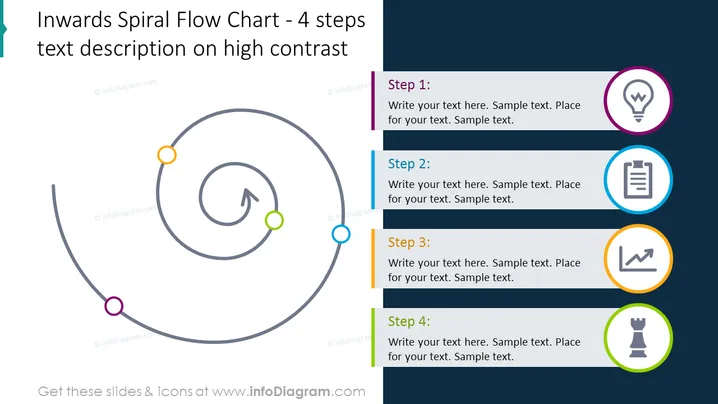
Die PowerPoint-Folie präsentiert einen Prozess mit einem "Inward Spiral Flow Chart - 4 Schritte Textbeschreibung auf hohem Kontrast." Sie beschreibt einen vierstufigen kreisförmigen Prozess, der sich in Richtung Zentrum windet. Jeder Schritt wird durch einen beschrifteten Kreis mit einer einzigartigen Farbe und einem Symbol daneben angezeigt, was auf einen Fortschritt oder einen Entwicklungsprozess hinweist, bei dem Details oder Komplexität zunehmen, je weiter man nach innen geht.
Das gesamte Erscheinungsbild der Folie ist poliert und professionell, mit einer sauberen und klaren visuellen Hierarchie, die die Augen des Betrachters entlang des Prozesses lenkt. Die kontrastierenden Hintergrundfarben und die Verwendung von Symbolen helfen, verschiedene Abschnitte zu unterscheiden und den Inhalt zu betonen.