

Your graphics add a nice touch to my presentations and I recently used them for one of my all-hands meetings. Your toolbox adds professionalism to my slides. Instead of using standard clipart.
Claude Jones, Director of Engineer, @Walmartlabs, USA

Your graphics add a nice touch to my presentations and I recently used them for one of my all-hands meetings. Your toolbox adds professionalism to my slides. Instead of using standard clipart.
Claude Jones, Director of Engineer, @Walmartlabs, USA
I needed a fresh look at some of my slides. I've tried to find a way to create a paintbrush effect, to underline, accentuate, add some color and the handwritten markers were just the things. Very easy to use, easy to size, change the color. It was an affordable, perfect solution and I'm happy to recommend it.
Anonymous, US
The crisp, clean look of the graphics, and the fact that it allowed me to easily edit and change the colors to match the template was my main reason for purchasing them.
Brandie Jenkins, E-learning Developer, USA
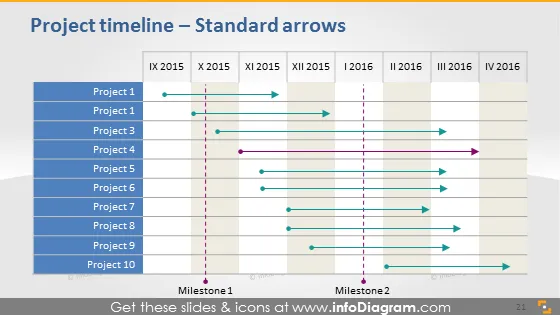
Diese PowerPoint-Folie veranschaulicht einen Projektzeitplan mit Standardpfeilen. Sie zeigt eine chronologische Anordnung von IX 2015 bis IV 2016 mit zehn horizontalen Spuren, die von 'Projekt 1' bis 'Projekt 10' beschriftet sind. Jede Spur hat einen farbigen Pfeil, der die Dauer des Projekts im Zeitplan anzeigt. Zwei vertikale gestrichelte Linien kennzeichnen 'Meilenstein 1' und 'Meilenstein 2' und markieren bedeutende Phasen oder Ereignisse innerhalb des Zeitplans. Die Pfeile und Meilensteine bieten eine klare visuelle Darstellung von Projektfolgen und kritischen Punkten.
Die Folie hat eine saubere und professionelle Ästhetik, mit einem farbkodierten System, das komplexe Terminierungsinformationen vereinfacht. Die visuellen Elemente sind so angeordnet, dass die Abfolge und Überlappung der Projekte sofort erkennbar sind.



