

Your graphics add a nice touch to my presentations and I recently used them for one of my all-hands meetings. Your toolbox adds professionalism to my slides. Instead of using standard clipart.
Claude Jones, Director of Engineer, @Walmartlabs, USA

Your graphics add a nice touch to my presentations and I recently used them for one of my all-hands meetings. Your toolbox adds professionalism to my slides. Instead of using standard clipart.
Claude Jones, Director of Engineer, @Walmartlabs, USA
I needed a fresh look at some of my slides. I've tried to find a way to create a paintbrush effect, to underline, accentuate, add some color and the handwritten markers were just the things. Very easy to use, easy to size, change the color. It was an affordable, perfect solution and I'm happy to recommend it.
Anonymous, US
The crisp, clean look of the graphics, and the fact that it allowed me to easily edit and change the colors to match the template was my main reason for purchasing them.
Brandie Jenkins, E-learning Developer, USA
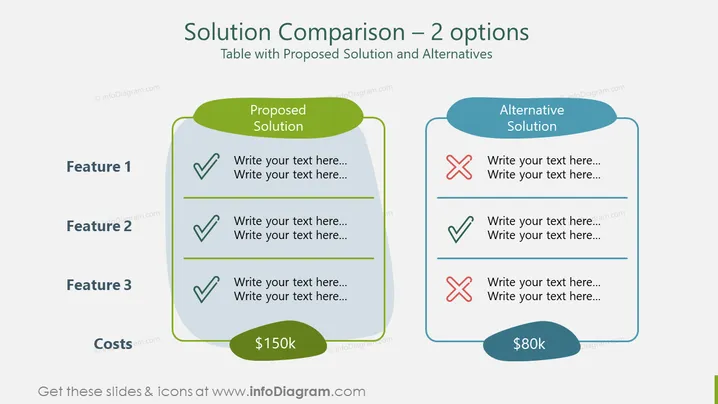
Die PowerPoint-Folie zeigt einen Vergleich zwischen zwei Lösungen und hebt deren Merkmale und Kosten hervor. Die vorgeschlagene Lösung hat drei Merkmale, die alle positiv bewertet sind, was darauf hindeutet, dass sie alle erforderlichen Kriterien erfüllt. Die alternative Lösung hat eine gemischte Bewertung mit einem positiv und zwei negativ bewerteten Merkmalen, was darauf hinweist, dass sie die erforderlichen Standards nicht vollständig erfüllt. Die vorgeschlagene Lösung ist teurer mit 150.000 $, während die alternative Lösung günstiger mit 80.000 $ ist, was auf einen Kompromiss zwischen Kosten und Merkmalen hinweist.
Das Gesamtbild der Folie ist sauber und professionell, wobei ein einfaches Design verwendet wird, um einen klaren Vergleich zwischen zwei Optionen zu ermöglichen. Die Farbkennzeichnung und die Häkchen/Kreuzzeichen bieten dem Betrachter sofortige visuelle Hinweise zur Eignung jeder Lösung.



