
Your graphics add a nice touch to my presentations and I recently used them for one of my all-hands meetings. Your toolbox adds professionalism to my slides. Instead of using standard clipart.
Claude Jones, Director of Engineer, @Walmartlabs, USA

Your graphics add a nice touch to my presentations and I recently used them for one of my all-hands meetings. Your toolbox adds professionalism to my slides. Instead of using standard clipart.
Claude Jones, Director of Engineer, @Walmartlabs, USA
I needed a fresh look at some of my slides. I've tried to find a way to create a paintbrush effect, to underline, accentuate, add some color and the handwritten markers were just the things. Very easy to use, easy to size, change the color. It was an affordable, perfect solution and I'm happy to recommend it.
Anonymous, US
The crisp, clean look of the graphics, and the fact that it allowed me to easily edit and change the colors to match the template was my main reason for purchasing them.
Brandie Jenkins, E-learning Developer, USA
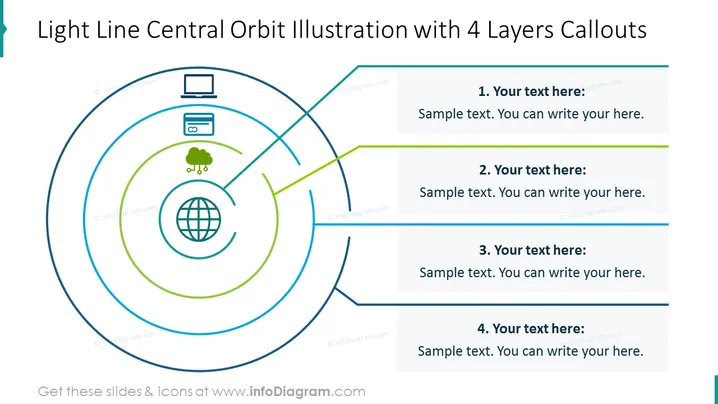
Zentrale Orbit-Illustration für 4 Schichten kann verwendet werden, wenn Sie die Beziehung zwischen der zentralen Entität und ihren Satelliten demonstrieren möchten. Sie können es in Präsentationen zu Themen wie organisatorische Struktur, Teamdynamik oder abteilungsübergreifende Beziehungen einsetzen. Sie können eine kurze Beschreibung jeder Schicht schreiben und Ihre Idee mit ekreativen Symbolen veranschaulichen. Alle Formen sind Vektoren, sodass Sie die Farben ändern und die Elemente nach Ihrem Geschmack ohne Qualitätsverlust größeren oder verkleinern können. Sehen Sie sich die Bearbeitungsanleitungen im Abschnitt „So bearbeiten Sie“ an. Sie können diese PPT-Vorlage auf Google Slides und Keynote herunterladen. ## Light Line Zentrale Orbit-Illustration für 4 Schichten Folien-Infografiken Weißer Hintergrund, Textfeld, Light Line Zentrale Orbit-Illustration, Globales Symbol, Datenwolken-Symbol, Kreditkarten-Symbol, Laptop-Symbol, Computer-Symbol