
Your graphics add a nice touch to my presentations and I recently used them for one of my all-hands meetings. Your toolbox adds professionalism to my slides. Instead of using standard clipart.
Claude Jones, Director of Engineer, @Walmartlabs, USA

Your graphics add a nice touch to my presentations and I recently used them for one of my all-hands meetings. Your toolbox adds professionalism to my slides. Instead of using standard clipart.
Claude Jones, Director of Engineer, @Walmartlabs, USA
I needed a fresh look at some of my slides. I've tried to find a way to create a paintbrush effect, to underline, accentuate, add some color and the handwritten markers were just the things. Very easy to use, easy to size, change the color. It was an affordable, perfect solution and I'm happy to recommend it.
Anonymous, US
The crisp, clean look of the graphics, and the fact that it allowed me to easily edit and change the colors to match the template was my main reason for purchasing them.
Brandie Jenkins, E-learning Developer, USA
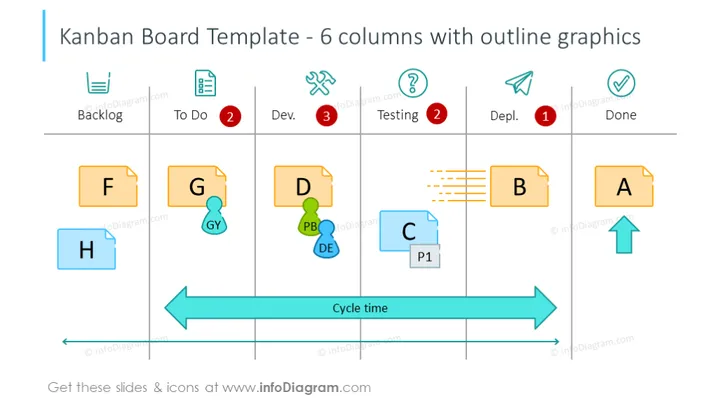
Die Folie veranschaulicht eine Kanban-Board-Vorlage mit 6 Spalten, die als Backlog, To Do, Dev., Testing, Depl. und Done gekennzeichnet sind und die Phasen des Aufgabenabschlusses darstellen. Jede Spalte enthält Karten (F, G, D, B, A, H, C), die Aufgaben in verschiedenen Phasen darstellen. Bemerkenswert ist, dass 'To Do' eine rote Benachrichtigung mit "2," 'Testing' mit einer ähnlichen "2," und 'Depl.' mit "1," hat, was auf eine Anzahl von Aufgaben hinweist. Der Pfeil 'Cycle time' zeigt den Fluss von Aufgaben durch die Phasen an. Das Konzept ist ein visuelles Werkzeug zur Verwaltung von Arbeit, während sie durch einen Prozess fließt, mit dem Fokus auf die Maximierung der Effizienz.
Die Folie ist visuell klar und gut strukturiert, nutzt einfache Icons und farbcodierte Elemente, um schnell die Phase und den Status von Aufgaben zu vermitteln. Die Verwendung von Farben, wie Rot für Benachrichtigungen und Blau für den 'Cycle time' Pfeil, zieht effektiv die Aufmerksamkeit auf wichtige Komponenten.