
Your graphics add a nice touch to my presentations and I recently used them for one of my all-hands meetings. Your toolbox adds professionalism to my slides. Instead of using standard clipart.
Claude Jones, Director of Engineer, @Walmartlabs, USA
Your graphics add a nice touch to my presentations and I recently used them for one of my all-hands meetings. Your toolbox adds professionalism to my slides. Instead of using standard clipart.
Claude Jones, Director of Engineer, @Walmartlabs, USA
I needed a fresh look at some of my slides. I've tried to find a way to create a paintbrush effect, to underline, accentuate, add some color and the handwritten markers were just the things. Very easy to use, easy to size, change the color. It was an affordable, perfect solution and I'm happy to recommend it.
Anonymous, US
The crisp, clean look of the graphics, and the fact that it allowed me to easily edit and change the colors to match the template was my main reason for purchasing them.
Brandie Jenkins, E-learning Developer, USA
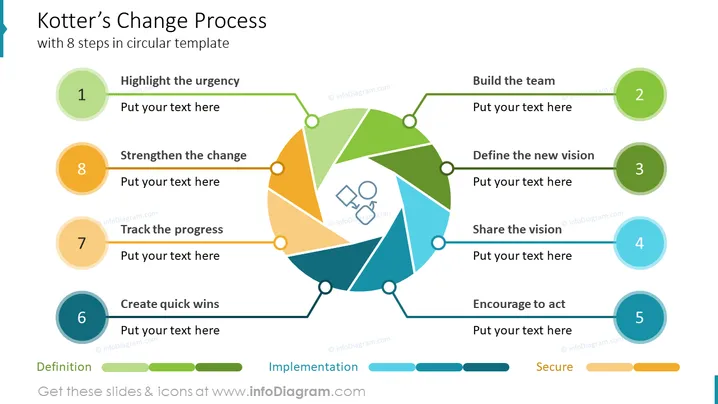
Dies ist das Veränderungsmodell von John Kotter mit einem 8-stufigen kreisförmigen Diagramm aus dem Deck Change Management Template. Diese Folie präsentiert eine 8-stufige Strategie für organisatorische Veränderungen. Betonen Sie die Dringlichkeit, bauen Sie das Team auf, definieren Sie die neue Vision, teilen Sie die Vision, ermutigen Sie zum Handeln, schaffen Sie schnelle Erfolge, verfolgen Sie den Fortschritt und stärken Sie die Veränderung.
Folienschablone mit bearbeitbaren PowerPoint-Formen und Text. Das Modell wird durch Grafiken eines kreisförmigen Linsendiagramms mit acht geordneten Punkten veranschaulicht. Die Punkte sind in drei Kategorien gegliedert:
Heller Hintergrund, 8 Schritte kreisförmiges Diagramm, farbenfrohes Infografik-Diagramm, flaches Symbol mit Zahlen, Linienvektor, skalierbare Formen




