

Your graphics add a nice touch to my presentations and I recently used them for one of my all-hands meetings. Your toolbox adds professionalism to my slides. Instead of using standard clipart.
Claude Jones, Director of Engineer, @Walmartlabs, USA

Your graphics add a nice touch to my presentations and I recently used them for one of my all-hands meetings. Your toolbox adds professionalism to my slides. Instead of using standard clipart.
Claude Jones, Director of Engineer, @Walmartlabs, USA
I needed a fresh look at some of my slides. I've tried to find a way to create a paintbrush effect, to underline, accentuate, add some color and the handwritten markers were just the things. Very easy to use, easy to size, change the color. It was an affordable, perfect solution and I'm happy to recommend it.
Anonymous, US
The crisp, clean look of the graphics, and the fact that it allowed me to easily edit and change the colors to match the template was my main reason for purchasing them.
Brandie Jenkins, E-learning Developer, USA
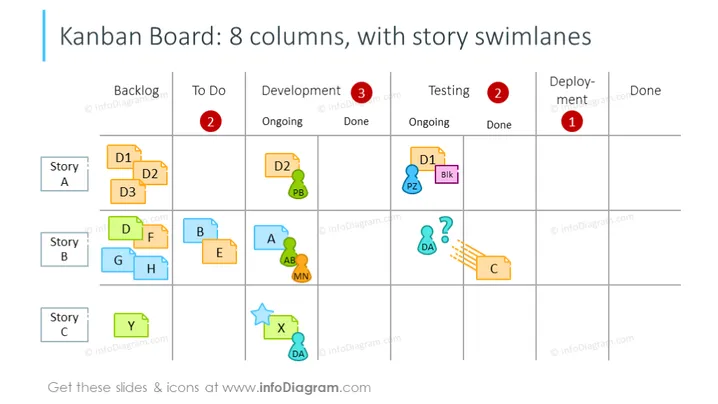
Die Folie präsentiert ein Kanban-Board mit 8 Spalten, die Betreffend den Rückstand, To-Do, Entwicklung (weiter unterteilt in Laufend und Erledigt), Testen (unterteilt in Laufend und Erledigt), Bereitstellung und Erledigt. Jede Spalte enthält alphanumerische Codes, die Aufgaben darstellen, die unter den Schwimmbahnen "Story A", "Story B" und "Story C" gruppiert sind, was verschiedene Projektkomponenten oder Benutzerstories signifyiert. Die Folie veranschaulicht, wie Aufgaben von links nach rechts von Rückstand zu Erledigt bewegt werden und ihren Fortschritt durch ihre Position anzeigen.
Die grafische Darstellung ist klar und farblich koordiniert und verwendet eine Mischung aus Primär- und Sekundärfarben, um Aufgaben und Icons zu unterscheiden. Es ist eine klare visuelle Darstellung des Fortschritts von Aufgaben und der Projektorganisation.



