
Your graphics add a nice touch to my presentations and I recently used them for one of my all-hands meetings. Your toolbox adds professionalism to my slides. Instead of using standard clipart.
Claude Jones, Director of Engineer, @Walmartlabs, USA
Your graphics add a nice touch to my presentations and I recently used them for one of my all-hands meetings. Your toolbox adds professionalism to my slides. Instead of using standard clipart.
Claude Jones, Director of Engineer, @Walmartlabs, USA
I needed a fresh look at some of my slides. I've tried to find a way to create a paintbrush effect, to underline, accentuate, add some color and the handwritten markers were just the things. Very easy to use, easy to size, change the color. It was an affordable, perfect solution and I'm happy to recommend it.
Anonymous, US
The crisp, clean look of the graphics, and the fact that it allowed me to easily edit and change the colors to match the template was my main reason for purchasing them.
Brandie Jenkins, E-learning Developer, USA
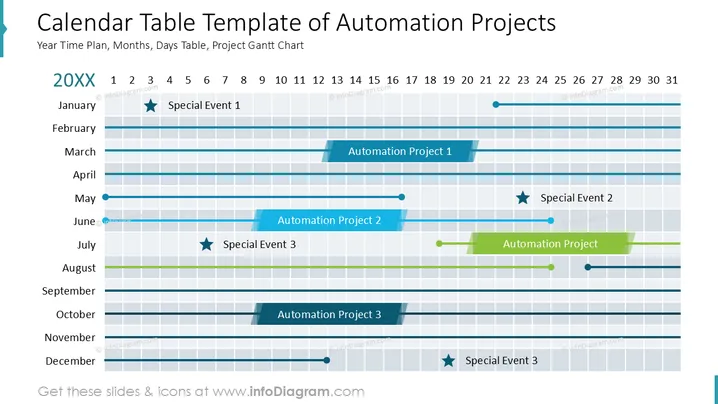
Diese Folie veranschaulicht einen Zeitplan für Automatisierungsprojekte über die Monate eines Jahres, mit markierten Schlüsseldaten. "Besonderes Ereignis 1" steht für ein bemerkenswertes Ereignis im Januar. "Automatisierungsprojekt 1" erstreckt sich von April bis Juni und zeigt eine laufende Aufgabe. Darauf folgt "Automatisierungsprojekt 2", das von Juni bis August läuft. Ein "Besonderes Ereignis 2" ist für Juli geplant. Eine weitere Aufgabe, "Automatisierungsprojekt", erstreckt sich über den August. Die Folie weist auch auf "Automatisierungsprojekt 3" für Oktober hin sowie auf ein "Besonderes Ereignis 3", das im Juli und Dezember stattfindet.
Die Folie ist visuell so strukturiert, dass sie leicht zu lesen ist, mit klarer Farbdifferenzierung zwischen den Elementen und einem Gitterlayout, das die Zeitpläne genau ausrichtet.




