
Your graphics add a nice touch to my presentations and I recently used them for one of my all-hands meetings. Your toolbox adds professionalism to my slides. Instead of using standard clipart.
Claude Jones, Director of Engineer, @Walmartlabs, USA
Your graphics add a nice touch to my presentations and I recently used them for one of my all-hands meetings. Your toolbox adds professionalism to my slides. Instead of using standard clipart.
Claude Jones, Director of Engineer, @Walmartlabs, USA
I needed a fresh look at some of my slides. I've tried to find a way to create a paintbrush effect, to underline, accentuate, add some color and the handwritten markers were just the things. Very easy to use, easy to size, change the color. It was an affordable, perfect solution and I'm happy to recommend it.
Anonymous, US
The crisp, clean look of the graphics, and the fact that it allowed me to easily edit and change the colors to match the template was my main reason for purchasing them.
Brandie Jenkins, E-learning Developer, USA
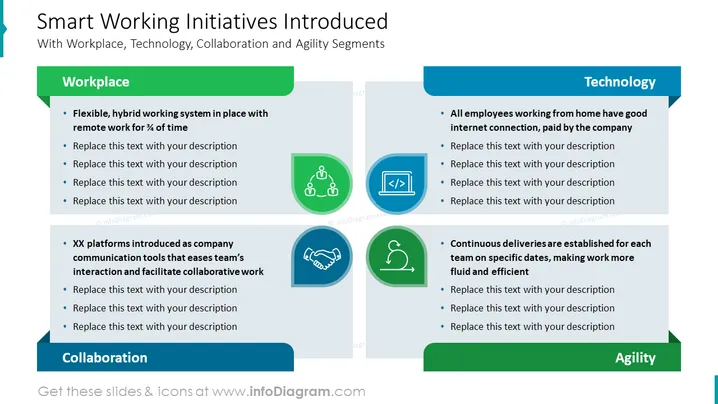
Die PowerPoint-Folie mit dem Titel "Initiativen für Smart Working Eingeführt" behandelt zentrale Strategien zur Verbesserung der Effizienz und Anpassungsfähigkeit am Arbeitsplatz, indem sie diese in die Bereiche Arbeitsplatz, Technologie und Zusammenarbeit unterteilt. Zum Beispiel wird im Bereich Arbeitsplatz ein flexibles, hybrides System vorgeschlagen, das remote Arbeit ¾ der Zeit ermöglicht. Im Bereich Technologie wird darauf hingewiesen, dass alle Mitarbeiter, die von zu Hause aus arbeiten, eine gute Internetverbindung haben sollten, die vom Unternehmen finanziert wird. Im Abschnitt Zusammenarbeit wird die Einführung von XX-Plattformen als Kommunikationswerkzeuge des Unternehmens erwähnt, die die Interaktion im Team und die Zusammenarbeit erleichtern. Schließlich wird im Bereich Agilität die kontinuierliche Lieferung betont, die für jedes Team an bestimmten Daten eingerichtet ist, um die Arbeit flüssiger und effizienter zu gestalten.




