
Your graphics add a nice touch to my presentations and I recently used them for one of my all-hands meetings. Your toolbox adds professionalism to my slides. Instead of using standard clipart.
Claude Jones, Director of Engineer, @Walmartlabs, USA

Your graphics add a nice touch to my presentations and I recently used them for one of my all-hands meetings. Your toolbox adds professionalism to my slides. Instead of using standard clipart.
Claude Jones, Director of Engineer, @Walmartlabs, USA

I needed a fresh look at some of my slides. I've tried to find a way to create a paintbrush effect, to underline, accentuate, add some color and the handwritten markers were just the things. Very easy to use, easy to size, change the color. It was an affordable, perfect solution and I'm happy to recommend it.
Anonymous, US
The crisp, clean look of the graphics, and the fact that it allowed me to easily edit and change the colors to match the template was my main reason for purchasing them.
Brandie Jenkins, E-learning Developer, USA
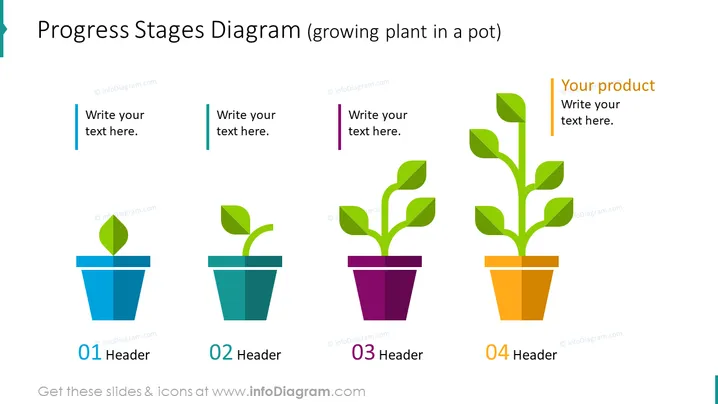
Die Folie zeigt ein "Fortschrittsstufen-Diagramm", das vier Entwicklungsstufen darstellt, die durch das Wachstum einer Pflanze in einem Topf repräsentiert werden. Jeder Topf entspricht einer anderen Stufe mit mehr Blättern, je weiter die Stufen fortschreiten. Die erste Stufe hat ein einzelnes Blatt, was die Anfangs- oder Startphase veranschaulicht. Die zweite Stufe zeigt einen Spross mit zwei Blättern, was eine frühe Entwicklung anzeigt. Im dritten Stadium hat die Pflanze einen Stamm mit mehreren Blättern, was ein fortgesetztes Wachstum zeigt. Schließlich zeigt die vierte Stufe eine vollständig entwickelte Pflanze, die die Reife oder den Abschluss des Projekts oder der Produktentwicklung anzeigt.
Das Gesamterscheinungsbild ist schick und modern, wobei flaches Design und lebendige Farben genutzt werden, um Fortschritt und Wachstum zu betonen. Das Layout ist symmetrisch mit allen Elementen, die horizontal in einer gleichmäßig verteilten Sequenz ausgerichtet sind.


