
Your graphics add a nice touch to my presentations and I recently used them for one of my all-hands meetings. Your toolbox adds professionalism to my slides. Instead of using standard clipart.
Claude Jones, Director of Engineer, @Walmartlabs, USA

Your graphics add a nice touch to my presentations and I recently used them for one of my all-hands meetings. Your toolbox adds professionalism to my slides. Instead of using standard clipart.
Claude Jones, Director of Engineer, @Walmartlabs, USA
I needed a fresh look at some of my slides. I've tried to find a way to create a paintbrush effect, to underline, accentuate, add some color and the handwritten markers were just the things. Very easy to use, easy to size, change the color. It was an affordable, perfect solution and I'm happy to recommend it.
Anonymous, US
The crisp, clean look of the graphics, and the fact that it allowed me to easily edit and change the colors to match the template was my main reason for purchasing them.
Brandie Jenkins, E-learning Developer, USA
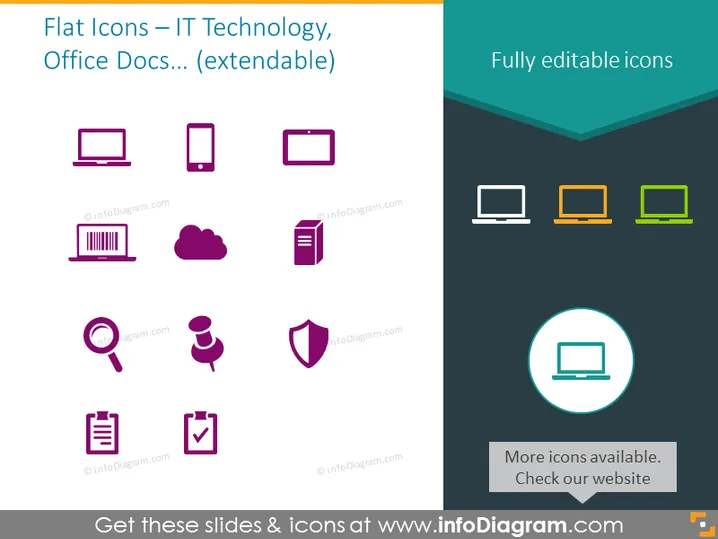
Die Folie hebt wahrscheinlich eine Reihe von flachen Icons hervor, die auf Präsentationen im Zusammenhang mit IT-Technologie und Büro-Dokumentation zugeschnitten sind. Es gibt mehrere Icons, die verschiedene technische Geräte und bürobezogene Konzepte anzeigen. Die Geräte umfassen einen Desktop-Computer, ein Smartphone, ein Tablet und einen Barcode, die für Hardware und Informationsscanning-Tools stehen. Cloud- und Dateisymbole signalisieren Datenspeicherung und Dokumentenformate, während ein Lupe-Icon, eine Figur mit Sprechblasen und ein Schild-Icon wahrscheinlich für Suche, Kommunikation und Sicherheit stehen. Eine Checkliste repräsentiert Aufgabenabschluss oder Verifizierungsprozesse.
Der Gesamteindruck der Folie ist sauber und modern, mit einer klaren Betonung auf visuellen Elementen. Der Farbkontrast segregiert effektiv verschiedene Icon-Sets, was hilft, ein organisiertes Layout aufrechtzuerhalten.