
Your graphics add a nice touch to my presentations and I recently used them for one of my all-hands meetings. Your toolbox adds professionalism to my slides. Instead of using standard clipart.
Claude Jones, Director of Engineer, @Walmartlabs, USA
Your graphics add a nice touch to my presentations and I recently used them for one of my all-hands meetings. Your toolbox adds professionalism to my slides. Instead of using standard clipart.
Claude Jones, Director of Engineer, @Walmartlabs, USA
I needed a fresh look at some of my slides. I've tried to find a way to create a paintbrush effect, to underline, accentuate, add some color and the handwritten markers were just the things. Very easy to use, easy to size, change the color. It was an affordable, perfect solution and I'm happy to recommend it.
Anonymous, US
The crisp, clean look of the graphics, and the fact that it allowed me to easily edit and change the colors to match the template was my main reason for purchasing them.
Brandie Jenkins, E-learning Developer, USA
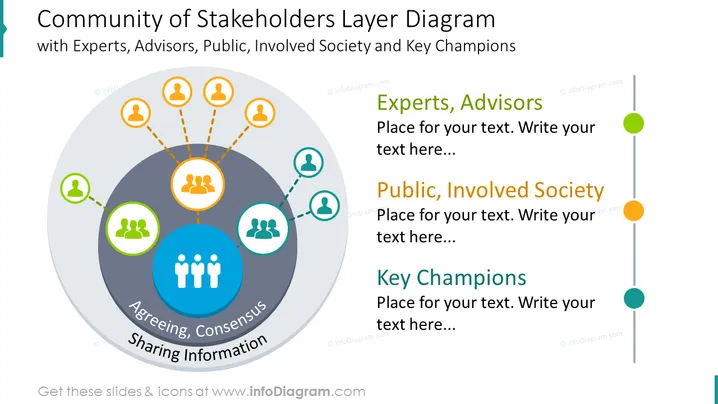
##Folieninhalt: Diese Folie zeigt die Stakeholder-Community mit einem Schichtdiagramm. Die innere Schicht besteht aus Vereinbarung und Konsens zwischen den Hauptexperten/Beratern, der Öffentlichkeit oder der beteiligten Gesellschaft und den key Champions. Die äußere Schicht zeigt die direkt Beteiligten unter jeder Person/Institution. Verwenden Sie diese Grafiken, um dichte Informationen auf einfachere Weise darzustellen. Wir haben Platz unter jedem Abschnitt hinzugefügt, damit Sie spezifische Stakeholder-Namen eintragen können. Sie können die Elemente auch ohne Qualitätsverlust bearbeiten. Videoanleitungen sind ebenfalls enthalten. Die Präsentation ist auch mit anderer Software kompatibel, wie Google Slides und Keynote. Klicken Sie auf das Bild, um die gesamte Sammlung zu sehen. ##Foliendesignbeschreibung: Schichtdiagramm, Umrisssymbole, Farbcode, Personenikone, Linienvektor, Berührungspunkte, gestrichelte Linienvektor




