
Your graphics add a nice touch to my presentations and I recently used them for one of my all-hands meetings. Your toolbox adds professionalism to my slides. Instead of using standard clipart.
Claude Jones, Director of Engineer, @Walmartlabs, USA
Your graphics add a nice touch to my presentations and I recently used them for one of my all-hands meetings. Your toolbox adds professionalism to my slides. Instead of using standard clipart.
Claude Jones, Director of Engineer, @Walmartlabs, USA
I needed a fresh look at some of my slides. I've tried to find a way to create a paintbrush effect, to underline, accentuate, add some color and the handwritten markers were just the things. Very easy to use, easy to size, change the color. It was an affordable, perfect solution and I'm happy to recommend it.
Anonymous, US
The crisp, clean look of the graphics, and the fact that it allowed me to easily edit and change the colors to match the template was my main reason for purchasing them.
Brandie Jenkins, E-learning Developer, USA
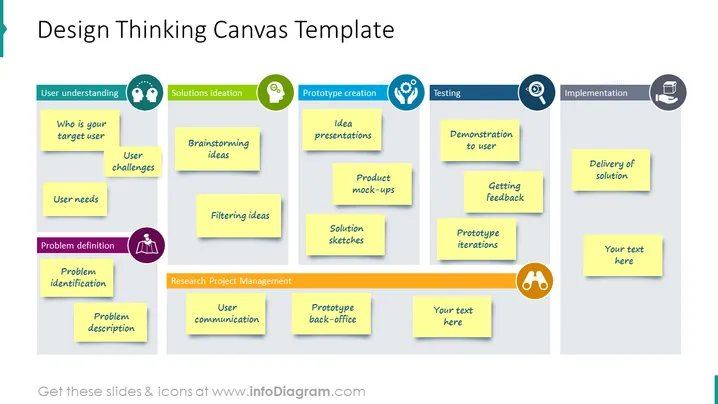
auf einem Board. Verstehen Sie Ihren Benutzer – wer sind sie, welche Herausforderungen haben sie und welche Bedürfnisse haben sie. Definieren Sie das Problem, identifizieren Sie es und beschreiben Sie es. Gehen Sie dann zu einer gesprächs-generierenden Ideation über, wie Brainstorming und Ideenfilterung. Für die Prototypenerstellung – Ideenpräsentation, Produkt-Mockups und Lösungsskizzen. In der Testphase zeigen Sie es den Benutzern, erhalten Sie Feedback und Prototyp-Iteration. Im Implementierungsprozess – Lieferung einer Lösung. Wir haben diese Beispiele aufgelistet, um Ihnen Inspiration für die Präsentation Ihres Textes zu geben. Alle Grafiken sind editierbar, sodass Sie die Grafiken nach Belieben anpassen können, ohne dabei an Qualität zu verlieren. Sie können die Präsentation in anderer Software herunterladen, wie Google Slides oder Keynote. Klicken Sie auf das Bild für weitere anschauliche Ideen. ## Folieninfografik-Beschreibung: PPT-Boards, Haftnotizen, flache Umriss-Stil-Icons, bunte Banner




