
Your graphics add a nice touch to my presentations and I recently used them for one of my all-hands meetings. Your toolbox adds professionalism to my slides. Instead of using standard clipart.
Claude Jones, Director of Engineer, @Walmartlabs, USA
Your graphics add a nice touch to my presentations and I recently used them for one of my all-hands meetings. Your toolbox adds professionalism to my slides. Instead of using standard clipart.
Claude Jones, Director of Engineer, @Walmartlabs, USA
I needed a fresh look at some of my slides. I've tried to find a way to create a paintbrush effect, to underline, accentuate, add some color and the handwritten markers were just the things. Very easy to use, easy to size, change the color. It was an affordable, perfect solution and I'm happy to recommend it.
Anonymous, US
The crisp, clean look of the graphics, and the fact that it allowed me to easily edit and change the colors to match the template was my main reason for purchasing them.
Brandie Jenkins, E-learning Developer, USA
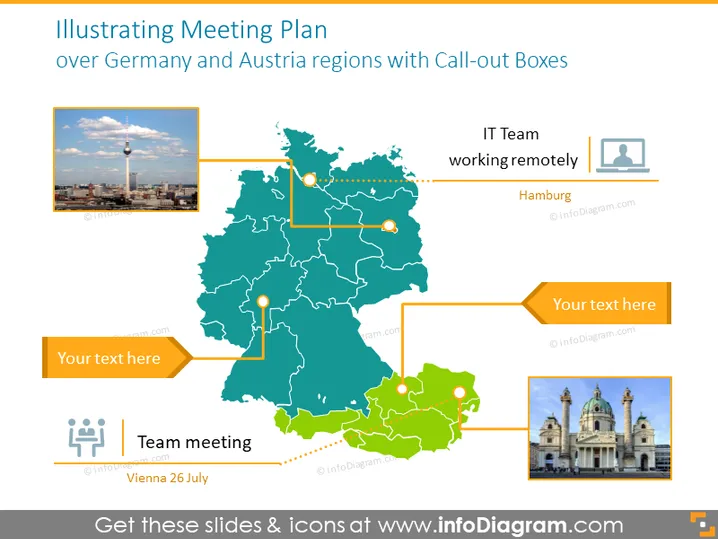
Die PowerPoint-Folie mit dem Titel "Veranschaulichung des Besprechungsplans für die Regionen Deutschland und Österreich mit Call-out-Boxes" zeigt eine Karte, die spezifische Orte markiert, die mit festgelegten Besprechungsplänen verbunden sind. Sie nutzt Call-out-Boxes, die mit mehreren Punkten auf der Karte verbunden sind, mit Platzhaltert_texten, die vorschlagen, dass weitere Einzelheiten zu den Besprechungen eingegeben werden können. Es gibt auch eine Bezeichnung für ein IT-Team, das remote in Hamburg arbeitet, ein weiteres Textfeld mit nicht näher bezeichnetem Inhalt und eine Bildunterschrift über ein Teammeeting in Wien am 26. Juli.
Das Gesamtbild der Folie ist professionell und informativ, mit klaren visuellen Hinweisen, um Textinformationen mit spezifischen geografischen Standorten zu verbinden. Die Farbpalette ist stimmig und deutet auf eine strukturierte und organisierte Präsentation hin.




